
For reviewers and educators
Ossidex: resources for an independent review
Ossidex is a DICOM viewer for iPhone and iPad. These resources help reviewers and educators evaluate the product with repeatable tasks and describe its capabilities accurately. The review’s conclusions are yours.
Short description
Ossidex opens CT, dental CBCT and MRI studies on iPhone and iPad. It imports DICOM files, folders, archives and links, with 2D, MPR, 3D and a dental panoramic arch. Images are processed on the device and no account is required.
Assets for your coverage
Six videos with descriptions and downloads · App icon · iPad panoramic arch · iPad MRI
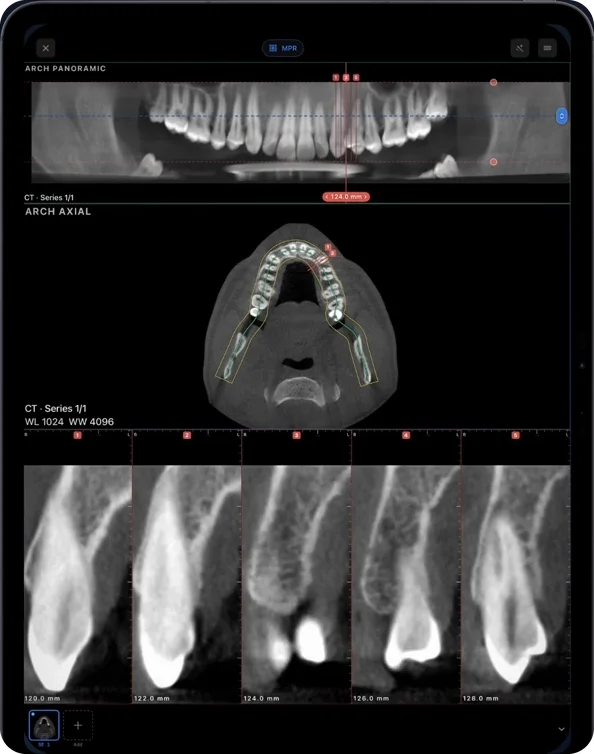
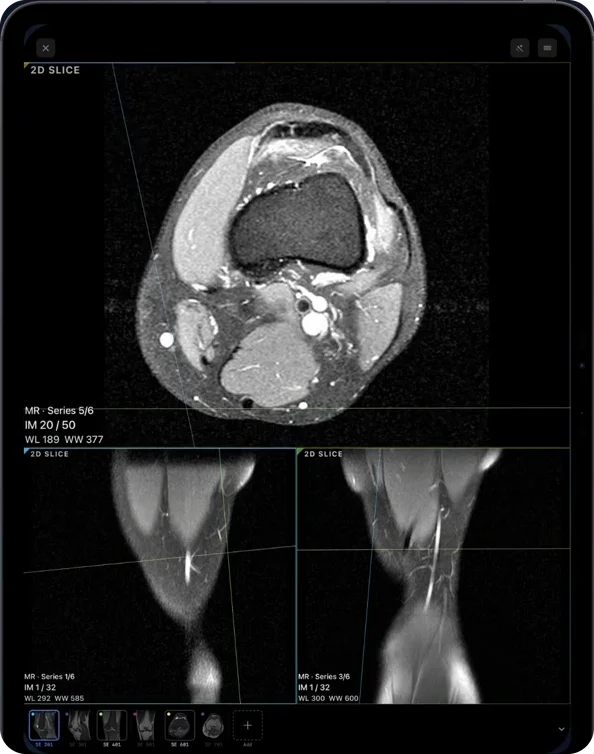
You may reproduce the promotional assets on this page in reviews and educational coverage of Ossidex with credit and a link to ossidex.com. This does not transfer rights to third-party datasets or imply a scanner vendor’s endorsement.
Evaluation tasks
- Record app version, device model, OS version and the source/revision of each sample.
- Open the built-in sample and inspect 2D, MPR, 3D, the arch and cross-sections. All sample tools are unlocked.
- Import a permitted test study as a folder or ZIP. Check series count, slice order and orientation.
- With Pro, compare the panorama with the original slices, edit the curve and export an arch PDF. Mark tasks you could not test.
- For MRI, use series from one study and check the references across planes. Distinguish a 2D acquisition from a volumetric one.
- After import, try viewing without a connection. If timing operations, publish study size, device and method.
- Report successes, failures and limitations. Disclose complimentary access, payment or any commercial relationship, if applicable.
Facts to include
Ossidex opens studies in 2D, linked MPR, 3D and the dental arch, with measurements and reports. Try the tools on the built-in dental CBCT and brain MRI samples. The browser viewer offers free 2D and MPR, with a linear ruler in millimetres when valid spatial calibration is available. The ruler is unavailable without valid spacing. Angle measurements, ROI, export, 3D and the dental arch are available in the iPhone/iPad app. There are no released native Windows or Android apps. Ossidex plans dental implants on CBCT in the iPhone and iPad app. Choose one of more than 16,000 implants from 129 manufacturers or enter the dimensions yourself, adjust position, angle and depth in linked cross-sections, panorama and 3D, follow proximity warnings for neighbouring implants and the mandibular canal, then save the plan or export a PDF report. Version 2.0 adds parallel alignment, angles between implants and bone density along each implant. Videos are earlier recordings, not a demonstration of every control in the current release.
Implant planning and the dental arch open the iPhone/iPad app offer. The browser provides 2D and MPR viewing; it does not edit implant plans or generate guides.
Sources and contact
Compatibility evidence and limits · Release history · Editorial policy. For factual questions: support@ossidex.com.
Related pages
About Ossidex
Who builds Ossidex, what the app is for, how we handle your scans, and how we test support for real-world discs from clinics and hospitals.
Ossidex videos: CBCT, MRI, MPR and dental arch
Watch Ossidex how-to videos for scan folders, DICOMDIR, download links and implant planning, alongside recorded CBCT, MRI, MPR and dental arch demos.
DICOM export compatibility reference
Compare documented DICOM exports and tested public samples by scanner software: folders, DICOMDIR, codecs and project files. Download the CSV or JSON reference.
Ossidex: built-in samples and your own studies
Ossidex is free to download and try with dental CBCT and brain MRI samples. Pro unlocks the full toolset on your studies; see current App Store terms.
Free online DICOM viewer: open CT, MRI and X-ray in your browser, no upload
Open CT, MRI and X-ray DICOM files online for free on Mac, Windows or iPad. Local 2D and MPR viewing, no upload, installation or account.