
Compare DICOM viewers
Compare DICOM viewers: Ossidex vs desktop and mobile alternatives
Choose a viewer for the device and workflow you use. Ossidex brings studies to iPhone and iPad; the comparisons below also explain when a desktop or browser viewer fits better.
How to choose
- You read studies at a Windows or Mac workstation all day: a desktop viewer such as RadiAnt, MicroDicom, Weasis, Horos or OsiriX MD is the natural tool. Ossidex does not replace a reading workstation.
- You need to open a study away from the desk — in the consultation room, on a ward round, at home, or when a patient hands you a disc — a native iPhone/iPad app is faster than carrying a laptop. That is what Ossidex is built for.
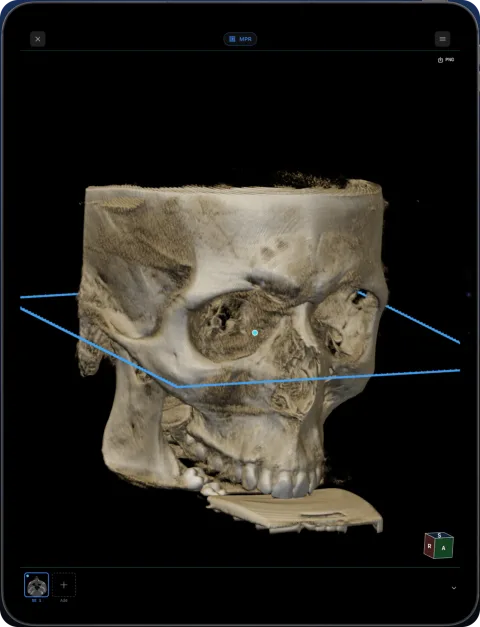
- You work with dental CBCT: look for a panoramic arch with cross-sections. Ossidex has one; most general viewers do not list it.
Details: More about this workflow
Most popular DICOM viewers run on a desktop: MicroDicom and RadiAnt on Windows, Horos and OsiriX on Mac, Weasis on all three, OHIF in a browser. Ossidex is an app for iPhone and iPad. The comparisons below show platforms, prices and features side by side, including where the other viewer is the better choice.
Details: All viewers at a glance
| Viewer | Platforms | Price model | iPhone / iPad app | MPR / 3D | Dental arch / panorama |
|---|---|---|---|---|---|
| Ossidex | iPhone, iPad | Built-in samples; App Store terms | Yes | Yes (Pro) | Yes (Pro) |
| MicroDicom | Windows (Mac only via Wine package) | Free non-commercial; paid commercial licence | No | Yes | Not listed |
| RadiAnt | Windows (Mac only via CrossOver/Wine) | Subscription (monthly to 5-year) | No | Yes | Not listed |
| Weasis | Windows, macOS, Linux | Free, open source | No | Yes | Not listed |
| Horos | macOS | Free, open source | Horos Mobile (Falcon Mx) by partner iCat Solutions | Yes | Not listed |
| Falcon Mx (Horos Mobile) | iPhone, iPad, Mac, Apple Vision Pro | Free download; in-app subscriptions | Yes (iOS 26+) | Yes | Not listed |
| OsiriX MD / Lite | macOS (OsiriX HD on iOS) | MD subscription; Lite free | OsiriX HD (updated 2023) | Yes | Curved MPR (MD) |
| 3DICOM | Web, Windows, Mac, iOS, Android | Yearly plans; free mobile app | Yes (needs internet) | 3D focus | Not listed |
| IMAIOS DICOM Viewer | Web, iOS, Android | Free for personal / non-commercial use | Yes | Yes | Not listed |
| LumaDICOM | iPhone, iPad | Free | Yes | Yes | OPG panorama |
| OHIF | Web browser | Free, open source | No native app | Yes | Not listed |
| Bee DICOM | Windows, macOS | Free | No | Yes | Not listed |
Checked: September 2026, on the vendor sites and the US App Store (sources below). Prices are as listed on the vendor site, September 2026, and may change.
“Not listed” means we did not find the feature on the vendor’s site; it does not prove the feature is absent.
Coming from a desktop viewer?
MicroDicom, RadiAnt, Horos — now on your iPad
Most DICOM viewers are built for Windows or Mac. If you want to open the same studies away from the desk, here is how Ossidex compares.
Best DICOM viewers 2026
14 desktop, web and mobile DICOM viewers compared: platforms, price, open source, offline use, PACS and iPad.
MicroDicom alternative for Mac, iPhone and iPad
MicroDicom is a Windows DICOM viewer with no native Mac or iOS version. Ossidex opens the same studies on iPhone and iPad. Honest comparison, checked 2026.
RadiAnt alternative for Mac, iPhone and iPad
RadiAnt DICOM Viewer runs on Windows only; Mac needs CrossOver or Wine. Ossidex opens CT, CBCT and MRI natively on iPhone and iPad. Fair comparison, 2026.
Horos alternative for iPhone and iPad
Horos is a free macOS DICOM viewer; its iPad counterpart Horos Mobile (Falcon Mx) comes from partner iCat Solutions. How both compare with Ossidex, 2026.
Weasis alternative for iPhone and iPad
Weasis is a free open-source DICOM viewer for Windows, macOS and Linux, with no iOS app. Ossidex opens the same studies on iPhone and iPad. Comparison 2026.
OsiriX alternatives: Mac viewers and an iPad option
Alternatives to OsiriX MD and OsiriX Lite on the Mac — Horos, Weasis, 3D Slicer — and on iPad and iPhone without a Mac. Prices and features, checked 2026.
Alternatives and head-to-head comparisons
Best DICOM viewers 2026
14 desktop, web and mobile DICOM viewers compared: platforms, price, open source, offline use, PACS and iPad.
MicroDicom alternative for Mac, iPhone and iPad
MicroDicom is a Windows DICOM viewer with no native Mac or iOS version. Ossidex opens the same studies on iPhone and iPad. Honest comparison, checked 2026.
RadiAnt alternative for Mac, iPhone and iPad
RadiAnt DICOM Viewer runs on Windows only; Mac needs CrossOver or Wine. Ossidex opens CT, CBCT and MRI natively on iPhone and iPad. Fair comparison, 2026.
Weasis alternative for iPhone and iPad
Weasis is a free open-source DICOM viewer for Windows, macOS and Linux, with no iOS app. Ossidex opens the same studies on iPhone and iPad. Comparison 2026.
Horos alternative for iPhone and iPad
Horos is a free macOS DICOM viewer; its iPad counterpart Horos Mobile (Falcon Mx) comes from partner iCat Solutions. How both compare with Ossidex, 2026.
OsiriX alternatives: Mac viewers and an iPad option
Alternatives to OsiriX MD and OsiriX Lite on the Mac — Horos, Weasis, 3D Slicer — and on iPad and iPhone without a Mac. Prices and features, checked 2026.
3DICOM alternative
3DICOM offers web, desktop and mobile apps with yearly plans; its mobile app needs internet. Ossidex works on-device on iPhone and iPad. Comparison 2026.
OHIF Viewer vs a native iPad app
OHIF is a free open-source web DICOM viewer that needs a DICOMweb server. Ossidex is a native iPhone and iPad app for local files, discs and links.
Bee DICOM Viewer alternative for iPhone and iPad
Bee DICOM Viewer is a free Windows and Mac desktop app with no iPhone or iPad version. Ossidex opens CT, CBCT and MRI natively on iOS. Comparison, 2026.
Ossidex vs IMAIOS DICOM Viewer (IDV)
IMAIOS DICOM Viewer is free for personal use on web, iOS and Android. Ossidex adds a dental arch, archives, cloud links and PACS. Where each wins, 2026.
Ossidex vs OsiriX HD
OsiriX HD is a free iOS DICOM viewer last updated in 2023, strong on DICOM networking. Ossidex is actively updated with MPR, 3D and a dental arch.
Ossidex vs LumaDICOM
LumaDICOM is a new free iOS DICOM viewer with MPR, 3D and OPG panorama. How it compares with Ossidex on imports, dental tools, PACS and price, 2026.
Ossidex vs Falcon Mx (Horos Mobile)
Falcon Mx (formerly Horos Mobile) and Ossidex compared: iOS version, subscriptions, imports, PACS, MPR/3D and dental CBCT.
Frequently asked questions
Where do I compare iPad and iPhone apps specifically?
Ten iOS DICOM apps — with import options, offline use, last update and ratings — are compared in best DICOM viewer apps for iPad and iPhone. Desktop and web viewers are in the 2026 roundup.
Is there a free DICOM viewer for Mac?
Yes: Horos, Weasis, OsiriX Lite and Bee DICOM run natively on macOS for free. MicroDicom and RadiAnt are Windows programs.
Can Ossidex replace my desktop viewer?
For viewing, measuring and showing studies on iPhone or iPad, often yes. For all-day diagnostic reading at a workstation, keep your desktop or PACS viewer.
Related pages
Best DICOM viewers 2026
14 desktop, web and mobile DICOM viewers compared: platforms, price, open source, offline use, PACS and iPad.
Best DICOM viewer apps for iPad and iPhone
Ten iOS DICOM apps compared: imports, offline use, MPR/3D, dental tools, last update and ratings.
Online DICOM viewer vs app
Browser viewers compared, what uploading means for privacy, and when an app is the better tool.
Try the Ossidex DICOM viewer on iPhone and iPad
Try Ossidex with built-in dental CBCT and brain MRI samples. Explore 2D, MPR, 3D, measurements and dental tools on iPhone and iPad before using your studies.
Ossidex features: a full DICOM viewer on iPhone and iPad
Everything Ossidex does: 2D viewing, MPR, 3D rendering, a dental panoramic arch, measurements and PDF reports, cloud-link and PACS import, on-device privacy.