
For veterinarians
Veterinary DICOM viewer for iPhone and iPad
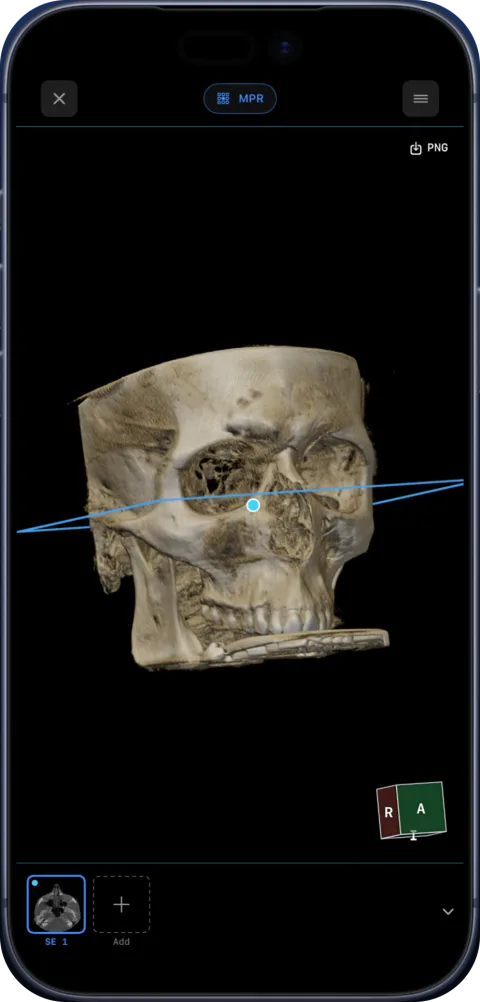
Ossidex is a DICOM viewer app for iPhone and iPad, and veterinary CT, MRI, dental CBCT and X-ray studies are standard DICOM, so they open the same way as human scans: 2D, MPR, 3D and measurements, from a disc folder, an archive or a link sent by a referral centre.
What vets use it for
- Referral studies — open the CT or MRI a referral hospital sent as a link or ZIP, on the tablet in the consulting room.
- Talking to owners — show a fracture, a mass or a dental problem on the patient’s own scan.
- Veterinary dentistry — CBCT of small-animal skulls in MPR and 3D; the arch view works on any dental CBCT volume.
- Radiographs — DX and CR X-rays exported as DICOM, with window/level and measurements.
Honest limits
Ossidex was designed around human anatomy. It has no species-specific presets, atlases or measurement protocols, patient fields show whatever the DICOM contains, and orientation labels follow the DICOM patient coordinate system, which in animals depends on how the study was acquired. The dental arch tool assumes a single curved arch you trace yourself, which works for many CBCT volumes but is not tailored to every species.
Getting studies onto the device
Ask the referral centre for DICOM (not JPEG) — as a ZIP, a disc image or a cloud link. Import it in Ossidex; archives, DICOMDIR discs and links from Google Drive, Dropbox, OneDrive and WeTransfer are all supported. Link import.
Common veterinary studies
| Study | Typical source | Useful view in Ossidex |
|---|---|---|
| Radiographs (DX/CR) | Clinic X-ray systems | 2D with window/level, length and angle measurements |
| CT | Referral centres, in-house CT | MPR and 3D for fractures, nasal cavity, thorax (Pro) |
| MRI | Referral centres | Linked series for spine and brain studies |
| Dental CBCT | Veterinary dental units | MPR and cross-sections along a traced curve (Pro) |
Orientation labels
DICOM orientation markers (L/R, A/P, H/F) follow the patient coordinate system the scanner recorded. For animals positioned in sternal or dorsal recumbency, these labels can look unusual compared with human scans — check how your scanner registers patient position. Ossidex shows the markers exactly as stored in the file and does not reinterpret them.
Referrals and owners
When a referral centre sends a CT or MRI back to the primary vet as a link or disc, Ossidex opens it on the clinic iPad without installing the centre’s viewer. For owners, showing the study on a tablet during a consultation is often clearer than a monitor across the room, and a PDF report or image can be exported to send afterwards. Exports are free for up to five studies in the library.
Getting started in a clinic
- Install on the clinic iPad. Ossidex is a free download for iPad and iPhone (iPadOS/iOS 17 or later).
- Try the sample. The built-in sample CBCT has every tool unlocked, so the team can learn MPR, 3D and measurements first.
- Import a real study. From the referral centre’s link, a USB stick from the X-ray system, or a PACS with DICOMweb.
- Keep cases organised. Studies are grouped under the patient name stored in the DICOM file — often the animal’s name with the owner’s surname.
Measurements for veterinary cases
Length and angle tools work on any DICOM image with pixel spacing, so they can be used for orientation on joint angles or dimensions on radiographs and CT. Ossidex has no built-in veterinary scoring or measurement protocols (for example for hip or elbow evaluation); draw the lines you need manually and export the annotated image or a PDF report. Hounsfield values from CT are available with the ROI tool and the HU probe.
Frequently asked questions
Do veterinary DICOM files differ from human ones?
No. The DICOM format is the same; veterinary studies open like any other.
Can I connect to our clinic PACS?
If it supports DICOMweb, yes. PACS / DICOMweb.
Is a veterinary DICOM viewer free in Ossidex?
2D viewing and measurements are free. MPR, 3D and multi-panel layouts on your own studies are part of Pro.
Can I open a referral centre’s CT on the clinic iPad?
Yes — paste the download link the centre sends (Google Drive, Dropbox, WeTransfer and others) or import the disc folder. The centre’s own viewer is not needed.
Related pages
MPR and 3D volume rendering on iPhone and iPad
Multi-planar reconstruction with linked crosshairs, oblique planes and slab MIP, plus 3D volume rendering with presets and clipping, for CT, CBCT and MRI.
Supported formats: every DICOM file, disc and archive Ossidex opens
Full list of what Ossidex opens on iPhone and iPad: DICOM, DICOMDIR, Enhanced multi-frame, NIfTI, JPEG 2000/HTJ2K/JPEG-LS, ZIP, RAR, 7z, ISO and more.
Cloud-link import: providers and limits
Which share links Ossidex imports — Google Drive, Dropbox, OneDrive, iCloud Drive, WeTransfer, Yandex Disk, Mail.ru — how downloads resume, what won’t work.
DICOM viewer without a computer: review CT and CBCT on an iPad
Can you review a CT or dental CBCT on an iPad instead of carrying a laptop? What works without a computer, how to get the files on the device, and the limits.
Free DICOM viewer for iPhone and iPad: what’s free, what’s Pro
Ossidex is free to download: import any CT, CBCT or MRI study, view it in 2D and measure. Here is exactly what is free and what Pro adds — no surprises.