
RadiAnt alternative
RadiAnt DICOM Viewer for Mac, iPhone and iPad? A mobile alternative
RadiAnt DICOM Viewer runs on Windows only. Its developer says a native Mac version is not planned and publishes guides for running it through CrossOver or Wine, and there is no iPhone or iPad app. To open the same studies on iPhone or iPad, Ossidex is a native iOS DICOM viewer with MPR, 3D and a dental arch. All options side by side: best DICOM viewers in 2026.
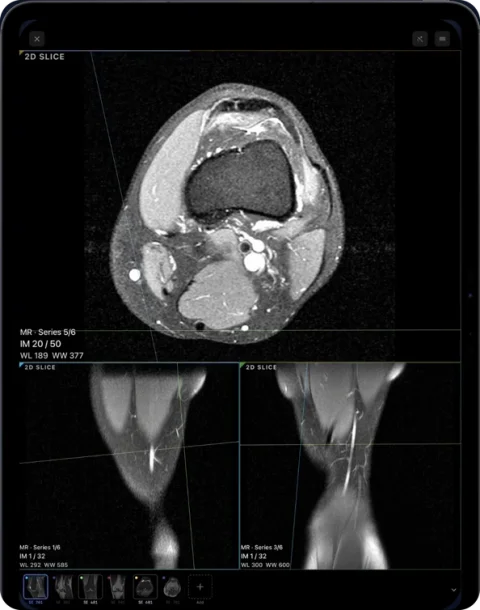
Is there RadiAnt for Mac?
No native one. Medixant, RadiAnt’s developer, supports Windows 7 to 11. Its own article on macOS says the Mac is not officially supported, a native version is not planned, and explains how to run the Windows program with CrossOver or Wine — with a warning that some features may crash. We found no RadiAnt app for iPhone or iPad in the App Store.
People searching “RadiAnt for Mac” or “RadiAnt for iPad” usually want one of two things: to keep a familiar Windows viewer, or simply to open a study on the device in front of them. For the second, a native viewer is more reliable than emulation — Horos, Weasis or OsiriX on a Mac, and Ossidex on iPhone and iPad.
Does RadiAnt run on Apple silicon Macs?
Only through a compatibility layer. Medixant’s macOS article describes installing the Windows version with CrossOver (commercial) or Wine (free) and warns that some features may crash; it is not an officially supported configuration. If you need RadiAnt’s exact workflow, a Windows virtual machine is the other route. If you simply need to read studies on a Mac, a native viewer avoids emulation entirely.
RadiAnt alternatives for Mac
| Viewer | Price | MPR / 3D | Closest RadiAnt strength |
|---|---|---|---|
| OsiriX MD | From $69.99/month | Yes / Yes | Speed, PET-CT, PACS — a full paid workstation |
| Horos | Free, open source | Yes / Yes | Everyday reading on a Mac at no cost |
| Weasis | Free, open source | Yes / Yes | Same viewer on Windows, Mac and Linux |
| 3D Slicer | Free, open source | Yes / Yes | 3D analysis and segmentation |
| Ossidex (iPad, iPhone) | Free download; Pro subscription | Yes (Pro) | No laptop needed: discs, archives and links on a tablet |
See also best DICOM viewers in 2026.
What RadiAnt does well
- Speed and a small footprint — a roughly 7 MB installer and a reputation for opening large studies quickly.
- A complete desktop toolset: MPR, 3D volume rendering, PET-CT fusion and DSA.
- PACS query/retrieve for connecting to hospital archives.
- A CD/DVD edition that runs from the disc without installation, often burned by imaging centres.
- Regular releases — version 2026.1 came out in August 2026.
RadiAnt is sold as a subscription since 2021 (€5 per month, €39 per year or €179 for five years per PC, as listed on the vendor site, September 2026).
RadiAnt vs Ossidex: side by side
| RadiAnt DICOM Viewer | Ossidex | |
|---|---|---|
| Platforms | Windows 7–11; macOS via CrossOver/Wine only (not supported) | iPhone, iPad (iOS/iPadOS 17+) |
| iPhone / iPad app | No | Yes, native |
| Price | €5/month, €39/year, €179/5 years per PC; CD edition €399 + €80/year maintenance | Free download; Pro subscription (monthly or yearly) for MPR, 3D, arch |
| Free option | Trial | Free 2D viewing and measurements; sample CBCT with all tools |
| Opens clinic discs | Yes; CD edition runs from the disc on Windows | Yes: import the copied disc folder or DICOMDIR |
| Archives and cloud links | Not listed | Archives: ZIP, RAR, 7z, TAR/GZ, ISO. Links: Google Drive, Dropbox, OneDrive, iCloud Drive, WeTransfer, Yandex Disk, Mail.ru Cloud, direct URLs |
| MPR / 3D | Yes | Yes (Pro): linked MPR, oblique, slab; 3D volume rendering |
| Fusion / DSA | PET-CT fusion, DSA | No |
| Dental panoramic arch | Not listed | Panoramic arch with cross-sections, tooth numbering (Pro) |
| NIfTI | Not listed | Yes (.nii, .nii.gz) |
| PACS | Query/retrieve | DICOMweb (QIDO-RS / WADO-RS); 3 free downloads, unlimited in Pro |
| Reports | Not listed | PDF report, image and anonymized export |
| Interface languages | Many | 46 |
Checked: September 2026, on the vendor sites and the US App Store (sources below). Prices are as listed on the vendor site, September 2026, and may change.
When to keep using RadiAnt
- You read on a Windows workstation and value RadiAnt’s speed and interface.
- You need PET-CT fusion, DSA or classic PACS query/retrieve.
- Your organisation already licenses RadiAnt or burns its CD edition for patients.
A desktop viewer and a mobile viewer are not rivals so much as tools for different places. Many clinicians keep RadiAnt on the PC and use a phone or tablet viewer for everything away from it.
When Ossidex fits better
- You use a Mac, iPhone or iPad and would rather not run Windows software through CrossOver or Wine.
- You open studies where they arrive — a disc at the front desk, a ZIP in a chat, a WeTransfer link from the imaging centre.
- You work with dental CBCT and want cross-sections along the arch on a tablet you can hand to the patient.
- You want nothing uploaded: studies are processed on the device, with no account.
- You want a free starting point: 2D viewing and measurements are free, with no trial period.
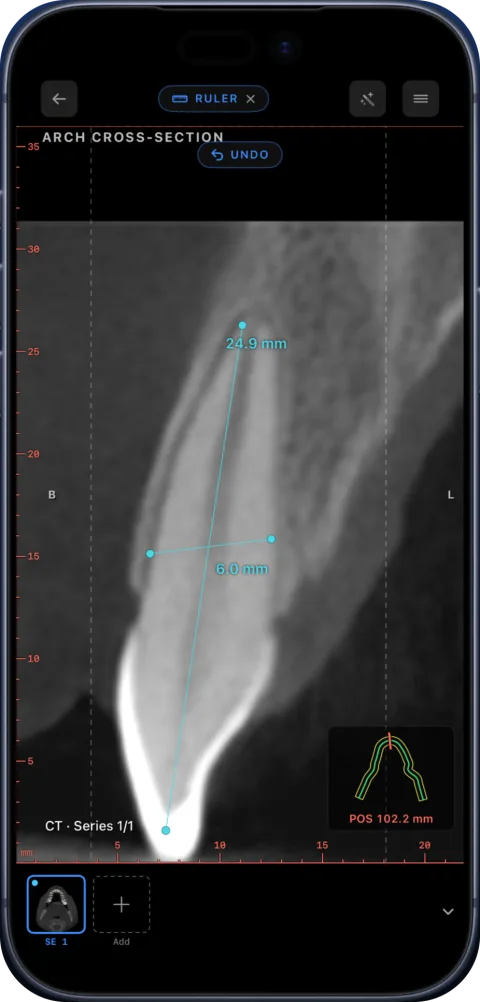
How to move a study from RadiAnt on Windows to your iPad
- Export or copy the study. In RadiAnt, export the study as DICOM to a folder, or simply copy the folder you already opened (for a disc, copy the whole disc, not only the viewer program).
- Get the folder onto the iPad or iPhone. Zip the folder and send it with AirDrop (from a Mac), save it to iCloud Drive, Google Drive, Dropbox or OneDrive, or copy it to a USB-C drive and plug the drive into the iPad.
- Import in Ossidex. Open Ossidex, tap the import button and choose the folder or ZIP in the Files picker. For a cloud share link, paste the link instead. Ossidex finds every study and series, including DICOMDIR discs.
- Read the study. Scroll slices in 2D, adjust window/level and measure. With Pro, switch to MPR, 3D or the dental panoramic arch. The study stays on the device and opens offline.
If the study came on a RadiAnt CD, copy the whole disc — the DICOMDIR and image folders — rather than the viewer program. See how to open a DICOM CD on iPhone or iPad.
What is free
RadiAnt offers a trial, then a paid subscription per PC. Ossidex has no trial period for its free tier: imports, 2D viewing and measurements stay free; MPR, 3D and the dental arch are Pro (pricing).
Frequently asked questions
Is RadiAnt available for Mac?
Not natively. The developer says a Mac version is not planned and describes running the Windows program with CrossOver or Wine, where some features may crash.
Is there a RadiAnt app for iPhone or iPad?
We did not find one in the App Store (September 2026). Ossidex is a native DICOM viewer for iPhone and iPad.
Can Ossidex open a disc burned with RadiAnt?
Yes. The images are standard DICOM. Copy the whole disc folder to Files and import it; the Windows viewer on the disc is not needed.
Is RadiAnt free?
RadiAnt offers a trial; ongoing use is a paid subscription (from €5 per month, as listed on the vendor site, September 2026). Ossidex has a free tier for 2D viewing.
Does Ossidex have PET-CT fusion like RadiAnt?
No. Ossidex focuses on CT, CBCT, MRI and X-ray viewing with MPR, 3D, the dental arch and measurements.
Sources
Related pages
Best DICOM viewers 2026
14 desktop, web and mobile DICOM viewers compared: platforms, price, open source, offline use, PACS and iPad.
MicroDicom alternative for Mac, iPhone and iPad
MicroDicom is a Windows DICOM viewer with no native Mac or iOS version. Ossidex opens the same studies on iPhone and iPad. Honest comparison, checked 2026.
Bee DICOM Viewer alternative for iPhone and iPad
Bee DICOM Viewer is a free Windows and Mac desktop app with no iPhone or iPad version. Ossidex opens CT, CBCT and MRI natively on iOS. Comparison, 2026.
View MRI scans on your phone
View MRI scans on iPhone or iPad: import the disc or link, understand series and sequences like T1, T2 and FLAIR, link windows and adjust contrast in Ossidex.
MPR and 3D volume rendering on iPhone and iPad
Multi-planar reconstruction with linked crosshairs, oblique planes and slab MIP, plus 3D volume rendering with presets and clipping, for CT, CBCT and MRI.
Best DICOM viewer apps for iPad and iPhone
Ten iOS DICOM apps compared: imports, offline use, MPR/3D, dental tools, last update and ratings.