
For dentists
DICOM and CBCT viewer for dentists on iPad
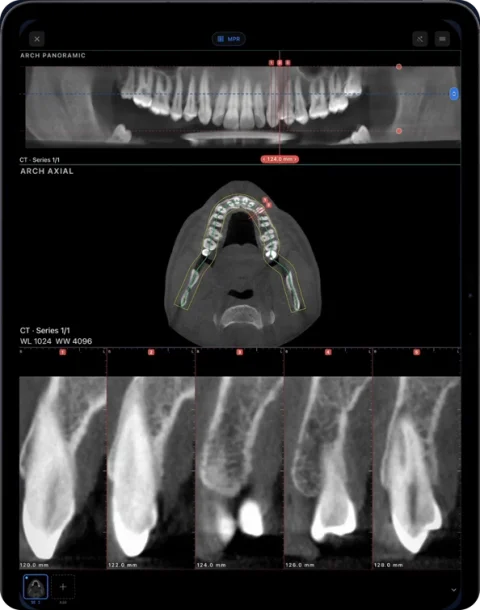
Ossidex (formerly MedScan) is a DICOM viewer app for iPhone and iPad that lets dentists open CBCT from any scanner — Planmeca, Sirona, Carestream, Vatech and others — and read it as a panoramic arch with cross-sections, MPR and 3D, at the chair or in a consultation. No laptop needed: the vendor’s software stays on the practice computer.
Why dentists use an iPad for CBCT
CBCT scans arrive from many places: your own unit, an imaging centre across town, a colleague in another city. Each comes with its own Windows viewer, and finding the right slice in unfamiliar software while the next patient waits is time nobody has. With Ossidex, every scan opens the same way on the iPad you already carry, and you can turn the screen towards the patient to show them their own anatomy.
- Any scanner, one interface — DICOM from every major CBCT brand opens in the same viewer. Vendor instructions.
- No laptop in the bag — the arch, MPR and 3D run on the iPad itself.
- No installer from a disc — Ossidex ignores the .exe viewer and reads the DICOM.
- Privacy — the scan stays on the device; nothing is uploaded. On-device privacy.
iPad at the chair vs the practice workstation
| Vendor software on the practice PC | Ossidex on an iPad | |
|---|---|---|
| Scans from other clinics | Needs the other vendor’s viewer or a DICOM import | Any standard DICOM, disc folder, ZIP or link |
| Where you can use it | At the workstation | Chairside, consultation room, other clinics, at home |
| Showing the patient | Turn the monitor | Hand over the iPad, pinch to zoom |
| Implant planning, surgical guides | Yes, in planning software | No — viewing and measurements only |
| Arch, cross-sections, MPR, 3D | Yes | Yes (Pro) |
Which CBCT viewers exist for iPad and how they compare: CBCT viewer for iPhone and iPad.
By specialty
Implantology and oral surgery
Review a site on cross-sections along the arch, follow the mandibular canal and the sinus floor, and measure height and width in millimetres. For impacted third molars and canines, check the relationship to neighbouring roots and the canal in MPR and 3D. Ossidex is for viewing — surgical planning and guide design stay in your planning software.
Endodontics
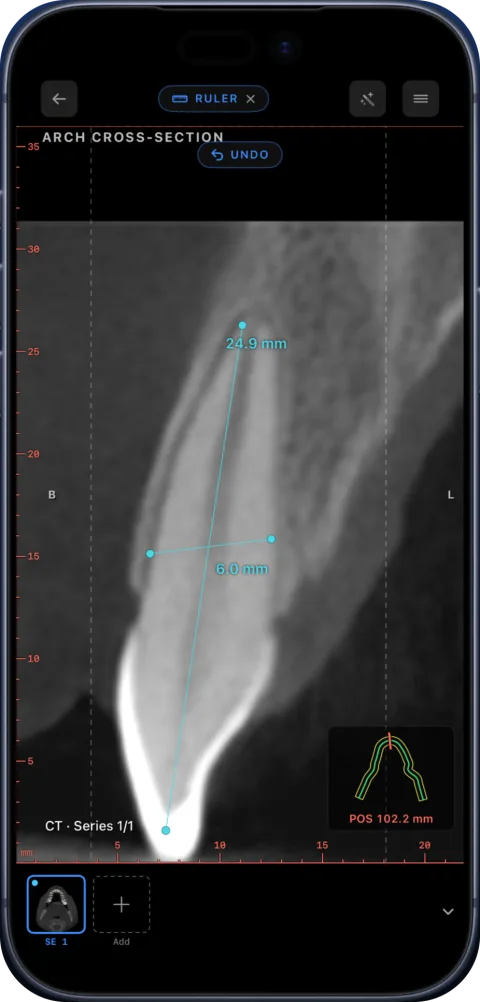
There is no separate endodontic module yet — the current tools cover the viewing task: step through MPR planes along the root, use a thin slab to follow a curved root, look at the area around the apex, and measure root length or canal width with the ruler.
Orthodontics
Open cephalometric X-rays and CBCT, measure lengths and angles, and look at impacted teeth and the airway in 3D.
TMJ and gnathology
Look at condyle shape and position on CBCT, and open the patient’s TMJ MRI in the same app — soft tissue and the articular disc are visible only on MRI. MRI on a phone or tablet.
Periodontics and general practice
Check bone levels on cross-sections and show patients what you see on the scan.
The tools that matter for dental work
- Panoramic arch with editable curve, live panorama and numbered cross-sections (details).
- MPR with linked crosshairs, oblique planes and slab.
- 3D volume with bone, teeth and airway presets and clipping.
- Measurements — length, angle, HU probe, tooth markers with FDI or Universal numbering, arrows and text.
- PDF report of the arch with the panorama and all cross-sections, and an anonymised export for sharing.
A typical day with Ossidex
A referral arrives with a link to a CBCT from an imaging centre: paste it into Ossidex on the iPad and the scan downloads and imports while you finish with the current patient. In the consultation, open the arch view, scroll to the site, show the patient the cross-section and measure the available bone. Later, a colleague asks about an endodontic case: the study is already in the patient’s folder on your iPad, and MPR with a thin slab answers the question in a minute. When you need to send a view onward, export the arch as a PDF report or make an anonymised copy of the study.
What to keep in mind
CBCT grey values are not calibrated Hounsfield units, so density readings are relative and vary between machines. Ossidex does not segment teeth, trace the canal automatically or plan implants.
Try the arch, MPR and 3D on the built-in sample CBCT before importing your own scans. Free vs Pro.
Frequently asked questions
Which CBCT brands can I open?
Any brand whose software exports standard DICOM, including Planmeca Romexis, Sidexis, CS 3D Imaging, Ez3D-i, OnDemand3D and NNT.
Can I show the scan to my patient?
Yes. Turning the iPad towards the patient and scrolling through the arch or 3D is one of the most common uses.
Does Ossidex do implant planning?
No. It is a viewer with measurements. Plan implants and guides in dedicated planning software.
Can I open TMJ MRI too?
Yes. MRI series open in the same app, with linked windows across series.
Related pages
Dental CBCT viewer
Panoramic arch, cross-sections, MPR and 3D for cone beam CT from any scanner.
Panoramic X-ray viewer
OPG, periapical and cephalometric DICOM X-rays, plus panoramas reconstructed from CBCT.
Dental panoramic arch and cross-sections from any CBCT
Trace the dental arch on a CBCT and get a live panorama with numbered cross-sections, tooth numbering, HU probe and a PDF report — on iPad and iPhone.
How to show a patient their scan on an iPad during a consultation
A practical workflow for explaining a CT, MRI or dental CBCT to a patient on an iPad: get the study onto the device, pick the views, measure, share safely.
DICOM viewer without a computer: review CT and CBCT on an iPad
Can you review a CT or dental CBCT on an iPad instead of carrying a laptop? What works without a computer, how to get the files on the device, and the limits.
Reviewing a CBCT before an implant
How to review a CBCT at a planned implant site: arch, cross-sections, ridge height and width, canal and sinus proximity. Ossidex is a viewer only.