
Dental CBCT
CBCT viewer for iPhone and iPad
Ossidex (formerly MedScan) is a CBCT viewer app for iPhone and iPad. It opens dental cone beam CT exported by Planmeca Romexis, Sidexis, CS 3D Imaging, Ez3D-i, OnDemand3D, NNT and other software as standard DICOM, and shows it as a panoramic arch with cross-sections, three-plane MPR and 3D, with measurements in millimetres — processed on the device, no laptop needed.
Dentists use Ossidex to open CBCT from Planmeca, Dentsply Sirona, Carestream, Vatech, NewTom and i-CAT on an iPad at the chair, as a panoramic arch with cross-sections.
What dentists use a CBCT viewer for
A CBCT volume answers questions a 2D radiograph cannot. Ossidex gives you the views to look at those questions wherever you are — chairside, in a consultation room or at home — without the workstation the scan was made on.
- Implant sites: bone height and width on cross-sections along the arch, the course of the mandibular canal, the floor of the maxillary sinus. Ossidex shows and measures; it does not design implants or surgical guides.
- Endodontics: number and curvature of roots and canals, periapical lesions, root fractures seen in several planes.
- Impacted teeth: position of a third molar or canine relative to neighbouring roots and the canal, in MPR and 3D.
- TMJ: condyle shape and position in sagittal and coronal planes (soft tissue and the disc need MRI, which Ossidex also opens).
- Airway and sinuses: the airway and the sinuses on sagittal and axial slices and in 3D.
- Patient conversations: turning an iPad towards the patient and scrolling through their own scan is often clearer than any printout.
Panoramic arch with cross-sections
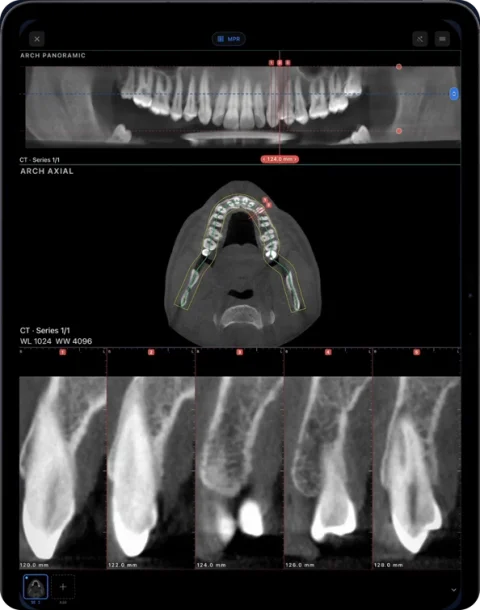
Trace the dental arch on an axial slice — or let Ossidex propose one and adjust its points — and the app reconstructs a panoramic image along the curve. Below it, cross-sections perpendicular to the arch are laid out in a row and numbered, the way desktop CBCT software presents them. The panorama follows your finger as you edit the curve, and you can shift the slice depth and thickness.
Measurements made on cross-sections stay attached to the arch, and the arch view can be exported as a PDF report with the panorama and every cross-section. How the arch works.
MPR, 3D and Hounsfield values
Beyond the arch, a CBCT opens in axial, sagittal and coronal MPR with linked crosshairs, oblique planes and slab thickness, and as a 3D volume with bone, teeth and airway presets and a clipping plane (MPR and 3D). The HU probe reads values under your finger. Keep in mind that CBCT grey values are not calibrated Hounsfield units the way medical CT values are, so density readings on CBCT are relative and differ between machines — see bone density classification.
CBCT and medical CT in the same viewer
Dental practices increasingly receive medical CT of the jaws and sinuses as well as CBCT. Ossidex opens both: medical CT carries calibrated Hounsfield units, so the HU probe and ROI statistics read true values, while CBCT values are relative. Both can be viewed in the arch view, MPR and 3D, and a TMJ MRI of the same patient opens alongside. Studies are grouped by patient in the library, so the CBCT, an older panoramic X-ray and an MRI live together on the device.
Scanners and software it works with
Every current dental CBCT system can export its volumes as standard DICOM. Ossidex reads that DICOM, so the brand of the machine does not matter; what matters is choosing a DICOM export rather than a proprietary project file.
| Vendor | Software | What to export | Notes |
|---|---|---|---|
| Planmeca | Romexis | DICOM (multi-frame or single-frame), optionally with Romexis Viewer | Romexis guide |
| Dentsply Sirona | Sidexis 4 / Galileos | DICOM export or the DICOM files from a Wrap&Go disc | Sidexis guide |
| Carestream Dental | CS 3D Imaging | Volume export to DICOM (DICOMDIR optional) | CS 3D guide |
| Vatech | Ez3D-i | “DCM Files” in the export dialog | Ez3D-i guide |
| Cybermed | OnDemand3D | DICOM export (not the project file) | OnDemand3D guide |
| NewTom (Cefla) | NNT | DICOM export | NNT guide |
| i-CAT / KaVo (now DEXIS) | Tx STUDIO, Invivo | Multi-file DICOM (not .inv/.apj) | i-CAT guide |
Discs made for patients usually contain both the DICOM files and a Windows viewer. Ossidex ignores the viewer and reads the DICOM. Open CBCT from any scanner.
CBCT viewers compared: vendor, web and iPad
Every CBCT vendor ships a viewer for its own scans, and a few apps open CBCT on phones and tablets. Checked on vendor documentation and the US App Store, September 2026:
| Viewer | Runs on | Any vendor’s DICOM | Arch + cross-sections | Offline | iPad |
|---|---|---|---|---|---|
| Romexis Viewer (Planmeca) | Windows, macOS | Opens DICOM | Yes | Yes | No |
| Sidexis 4 Viewer / Galileos Viewer | Windows | Own exams | Yes | Yes | No |
| CS 3D Imaging Lite (Carestream) | Windows | Own exports | Yes | Yes | No |
| Ez3D-i Simple Viewer (Vatech) | Windows | Own exports | Yes | Yes | No |
| mRomexis (Planmeca) | iPad | No — connects to a Romexis server | Server-dependent | No | Yes ($48.99, last updated 2019) |
| CBCTHub | iPhone, iPad; web sharing | Yes (vendor lists Carestream, Planmeca, Vatech, Sirona, Morita, NewTom) | Panoramic and oblique slices | Local rendering; account required | Yes |
| Dental CT View | iPhone, iPad | No — shows images pre-computed by an imaging centre | Pre-computed | After transfer | Yes |
| Ossidex | iPhone, iPad | Yes — any standard DICOM | Yes: editable arch, numbered cross-sections (Pro) | Yes | Yes |
Vendor viewers are the natural choice on the practice computer. On an iPad, the question is whether the app opens any clinic’s DICOM without a server or account — see how to open CBCT from any scanner.
How to get a CBCT onto your iPad
- Export or receive the scan. Export the volume as DICOM from your CBCT software, or take the disc, USB stick, ZIP or download link the imaging centre gave you.
- Move it to the device. Copy the whole folder to the Files app (from a Mac or PC, via AirDrop, or from a USB-C drive), save the archive from email or a messenger, or copy the share link. See importing from links.
- Import in Ossidex. Tap +, choose the folder, archive or link. Ossidex finds the CBCT series, including DICOMDIR discs and archives nested in archives.
- Open the arch. Open the study, switch to the arch view, trace or accept the proposed curve and scroll the cross-sections. Switch to MPR or 3D from the same screen.
Coming soon
- Implant planning Soon
- Endodontic tools Soon
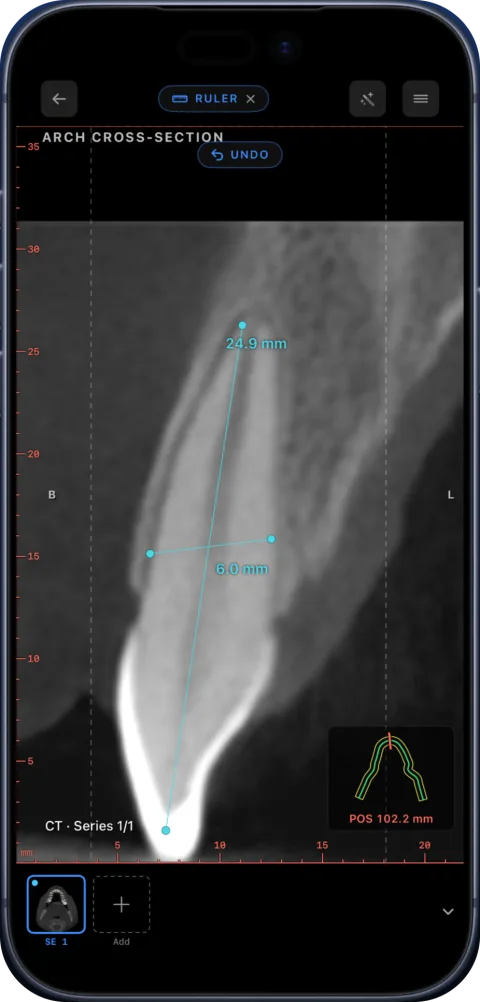
Today, bone height and width at a site and root length are measured with the ruler on cross-sections and MPR planes.
What Ossidex is not
Ossidex is a viewer. It does not plan implants, design surgical guides, segment teeth automatically or produce a diagnosis.
Measurements are distances computed from the pixel spacing stored in the DICOM; their accuracy depends on the scan’s resolution and quality. Proprietary files such as implant-planning projects must be exported to DICOM first.
The arch, MPR and 3D on your own studies are part of Pro; 2D viewing and measurements are free, and the built-in sample CBCT has every tool unlocked. Free vs Pro.
Frequently asked questions
What is the best CBCT viewer for iPad?
Most CBCT vendors only ship Windows or Mac viewers. Ossidex runs natively on iPad and iPhone and opens DICOM from any CBCT brand, with the panoramic arch, cross-sections, MPR and 3D.
Can I open a CBCT disc from another clinic?
Yes, if the disc contains DICOM files — nearly all patient discs do, next to a Windows viewer. Copy the whole disc folder to the Files app and import it. Step-by-step.
Does Ossidex show the mandibular canal?
You can follow the canal on cross-sections, MPR planes and the panorama and measure distances to it. Ossidex does not trace the canal automatically.
Can I measure bone for an implant?
You can measure height and width on cross-sections in millimetres. Ossidex is a viewer, not implant-planning software.
Is the CBCT uploaded to a server?
Scans are opened and processed on your iPhone or iPad. There is no account, and your images are not uploaded to Ossidex servers.
Does it also open CT and MRI?
Yes. Medical CT, MRI and X-ray DICOM open in the same app, so a TMJ MRI and a CBCT can sit in the same patient.
Can I view a CBCT without installing the vendor viewer?
Yes. The vendor viewer on a disc is only one program that reads the DICOM files next to it. Copy the whole disc or export to the iPad and import it in Ossidex; the Windows viewer is skipped.
Was Ossidex called MedScan before?
Yes. Ossidex was called MedScan until September 2026 — the same app and developer, renamed.
Sources
Related pages
Dental panoramic arch and cross-sections from any CBCT
Trace the dental arch on a CBCT and get a live panorama with numbered cross-sections, tooth numbering, HU probe and a PDF report — on iPad and iPhone.
Panoramic X-ray viewer
OPG, periapical and cephalometric DICOM X-rays, plus panoramas reconstructed from CBCT.
Open CBCT from any scanner
What is on a CBCT disc, what to export, and vendor-by-vendor instructions.
Dentists
CBCT from any scanner at the chair: arch, cross-sections, MPR, 3D and TMJ MRI.
How to show a patient their scan on an iPad during a consultation
A practical workflow for explaining a CT, MRI or dental CBCT to a patient on an iPad: get the study onto the device, pick the views, measure, share safely.
How to read a CBCT scan
Navigate a dental CBCT: axial, coronal and sagittal planes, panoramic reconstruction, cross-sections, window/level and common artifacts explained.
Reviewing a CBCT before an implant
How to review a CBCT at a planned implant site: arch, cross-sections, ridge height and width, canal and sinus proximity. Ossidex is a viewer only.
Panoramic X-ray vs CBCT
How a dental panoramic X-ray (OPG) differs from a CBCT: 2D projection vs 3D volume, distortion and magnification, and what each is typically used for.