
For radiologists
Mobile DICOM viewer for radiologists on iPhone and iPad
Ossidex is a DICOM viewer app for iPhone and iPad that radiologists use for a quick look at CT and MRI away from the reading room: a disc a patient brings, a study shared by link, or a PACS study over DICOMweb, with MPR, linked series and 3D. It complements, rather than replaces, a diagnostic workstation.
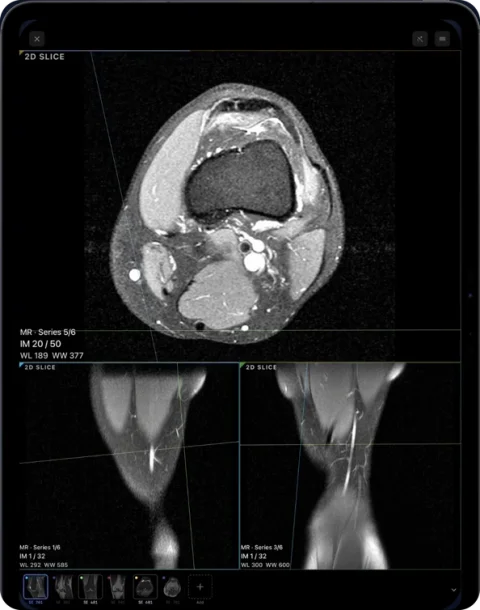
Where a mobile viewer helps
- Outside studies — a patient or referrer hands over a disc or sends a link; import the folder, ZIP or link and look before the formal read.
- A second look — a colleague asks you to glance at a series while you are away from the workstation.
- Teaching and discussion — show a case at a meeting or on a ward round on an iPad, with anonymised export for sharing.
- Your own PACS — connect to a DICOMweb (QIDO-RS/WADO-RS) endpoint and download studies directly to the device. PACS / DICOMweb.
Tools
- Window/level with presets and cine for multi-frame series.
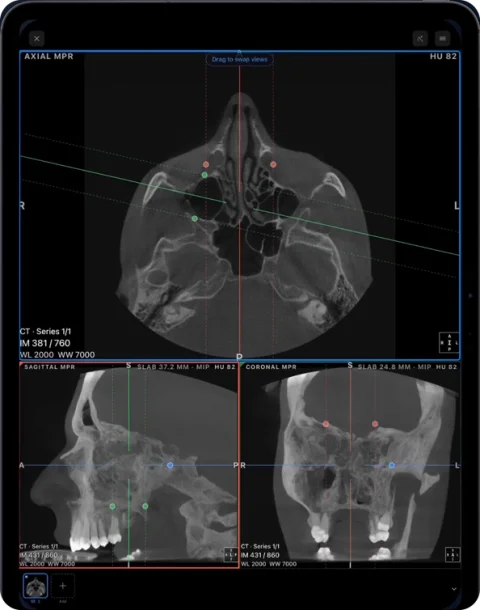
- MPR with linked crosshairs, oblique planes and slab MIP; linked reference lines across MRI series.
- 3D volume rendering.
- Length, angle, ROI with HU statistics and a HU probe on CT.
- Enhanced multi-frame CT/MR, NIfTI with segmentation masks as layers, and SEG/RTSTRUCT/GSPS/SR objects recognised alongside images.
What it is not
Ossidex runs on phone and tablet displays, which are not calibrated diagnostic monitors, and it has no reporting, worklist or hanging-protocol system. Use it for review and communication alongside your diagnostic workstation.
Typical situations
| Situation | How Ossidex helps |
|---|---|
| A colleague asks for a quick look while you are away from the reading room | Open the study from PACS via DICOMweb or from a shared link, scroll it in MPR |
| An outside study arrives on a patient disc | Copy the disc folder to the iPad and import it; the disc viewer is not needed |
| Multidisciplinary meeting or bedside discussion | Show MPR or 3D on an iPad and mirror it to a screen |
| Teaching | Linked MRI series, annotations and anonymized export for cases |
Connecting to PACS
- Get a DICOMweb endpoint. Your PACS or archive must expose QIDO-RS and WADO-RS (for example Orthanc with the DICOMweb plugin, dcm4chee, or a commercial PACS with DICOMweb enabled).
- Add the server. In Ossidex open PACS, enter the base URL and sign in (Basic or OAuth); credentials go to the iOS Keychain.
- Search and download. Find the study and download it; it stays on the device for offline viewing.
Data handling
Studies travel directly between your server and the device; nothing passes through Ossidex servers. Anonymized export removes patient identifiers before sharing a case. Classic DIMSE networking (C-FIND, C-MOVE, C-STORE) is not supported, and there is no worklist, reporting module or hanging protocol — Ossidex is a viewer to use alongside your reading workstation. See PACS and DICOMweb.
Formats you are likely to meet
Compressed transfer syntaxes (JPEG 2000, HTJ2K, JPEG-LS, JPEG Lossless, RLE), Enhanced multi-frame CT and MR with per-frame geometry, multi-series MRI and classic 4D series split into volumes, and NIfTI with segmentation masks as layers. Full format list.
Viewing on a phone or tablet: practical limits
- Phone and tablet screens are bright and sharp but not calibrated reading monitors; use them for review, consultation and teaching.
- Very large studies (thin-slice whole-body CT, long MRI protocols) are smoother on iPads with more memory; import only the series you need when possible.
- Window/level presets for bone, soft tissue and lung are one tap away; fine adjustment is a two-finger drag.
Frequently asked questions
Can Ossidex connect to our PACS?
Yes, if the PACS offers DICOMweb (QIDO-RS for search, WADO-RS for retrieval) with basic or OAuth authentication. Credentials are stored in the iOS Keychain. Classic DIMSE (C-FIND/C-MOVE) is not supported.
Is patient data sent to Ossidex?
Scans are opened and processed on your iPhone or iPad. There is no account, and your images are not uploaded to Ossidex servers.
Does it open Enhanced multi-frame and compressed studies?
Yes — Enhanced CT/MR, JPEG 2000, HTJ2K, JPEG Lossless, JPEG-LS and RLE. Formats.
Can I open an outside study that came on a patient disc?
Yes. Copy the disc folder to the iPad (or use a USB-C drive) and import the folder; Ossidex reads the DICOMDIR or scans the files and ignores the Windows viewer on the disc.
Related pages
Mobile PACS viewer: connect iPhone and iPad via DICOMweb
Connect Ossidex to your PACS over DICOMweb: search studies with QIDO-RS, download with WADO-RS, Basic or OAuth sign-in stored in the Keychain.
MPR and 3D volume rendering on iPhone and iPad
Multi-planar reconstruction with linked crosshairs, oblique planes and slab MIP, plus 3D volume rendering with presets and clipping, for CT, CBCT and MRI.
Enhanced multi-frame DICOM (CT and MR) on iPhone and iPad
Enhanced CT and MR store a whole series in one multi-frame DICOM file. How Ossidex reads per-frame geometry, calibration and 4D series on iPhone and iPad.
NIfTI viewer for iPhone and iPad: open .nii and .nii.gz files
Open NIfTI-1 volumes (.nii, .nii.gz) on iPhone and iPad with Ossidex: correct orientation, MPR and 3D, label maps and segmentation masks as layers.
DICOM viewer without a computer: review CT and CBCT on an iPad
Can you review a CT or dental CBCT on an iPad instead of carrying a laptop? What works without a computer, how to get the files on the device, and the limits.
View CT scans on iPhone and iPad
View CT scans on iPhone or iPad: import the disc or link, use Hounsfield-based window presets for bone, soft tissue and lung, and switch to MPR and 3D.