
MicroDicom alternative
MicroDicom for Mac, iPhone and iPad? A mobile alternative
MicroDicom is a Windows program: there is no native Mac version (only a Wine-based installer package) and no iPhone or iPad app. If you need to open the same DICOM studies on an iPhone or iPad, Ossidex is a native app that reads CT, CBCT and MRI from disc folders, archives and cloud links. All options side by side: best DICOM viewers in 2026.
Is there a MicroDicom version for Mac or iPhone?
According to MicroDicom’s download page, the viewer is built for Windows Vista to Windows 11 (32- and 64-bit). For macOS the vendor offers a “macOS wine installer package”, which runs the Windows program through a compatibility layer rather than as a native Mac app. There is no Linux build, and we found no MicroDicom app in the App Store for iPhone or iPad.
So if you search for “MicroDicom for Mac”, the options are: run the Wine package, run Windows in a virtual machine, or use a viewer that is native to the device you have. On a Mac that could be Horos, Weasis or OsiriX. On an iPhone or iPad it is an iOS app such as Ossidex.
MicroDicom alternatives on Mac
If you are on a Mac and want a native viewer instead of the Wine package, these are the established options (vendor sites, September 2026):
| Viewer | Price | Open source | MPR / 3D | Notes |
|---|---|---|---|---|
| Horos | Free | Yes (LGPL-3.0) | Yes / Yes | Closest to MicroDicom in everyday use; Apple silicon supported |
| Weasis | Free | Yes | Yes / Yes | Also on Windows and Linux; DICOMweb and DIMSE |
| OsiriX Lite | Free, with limits | No | Yes / Yes | Per-series image limit; OsiriX MD is the paid version |
| OsiriX MD | From $69.99/month | No | Yes / Yes | Full workstation with plugins and PACS |
| 3D Slicer | Free | Yes | Yes / Yes | Research platform: segmentation and analysis |
| Ossidex (on iPad or iPhone) | Free download; Pro subscription | No | Yes (Pro) | No Mac needed; discs, archives and links |
A wider comparison, including web viewers, is in best DICOM viewers in 2026.
What MicroDicom does well
MicroDicom is one of the most widely used free viewers on Windows, and for good reasons:
- Free for non-commercial use. Commercial use needs a licence (US$99 per PC, no expiry, as listed on the vendor site, September 2026).
- Runs straight from a patient CD, DVD or USB drive without installation, which is why many imaging centres burn it onto discs (portable edition sold separately).
- A full desktop toolset: MPR, 3D volume rendering, PET-CT/MR fusion and export to video (MP4/AVI).
- PACS client with C-FIND, C-MOVE, C-GET, C-STORE and DICOMweb.
- Actively maintained — version 2026.3 was released in June 2026.
MicroDicom vs Ossidex: side by side
| MicroDicom | Ossidex | |
|---|---|---|
| Platforms | Windows Vista–11; macOS via Wine package only | iPhone, iPad (iOS/iPadOS 17+) |
| iPhone / iPad app | No | Yes, native |
| Price | Free non-commercial; US$99 per PC commercial; portable edition US$349.99 | Free download; Pro subscription (monthly or yearly) for MPR, 3D, arch |
| Opens from clinic discs | Yes, can run from the disc on Windows | Yes: import the copied disc folder or DICOMDIR; the Windows viewer on the disc is not needed |
| Archives | Not listed | ZIP, RAR (incl. RAR5, multi-volume), 7z, TAR/GZ, ISO, password-protected |
| Cloud share links | Not listed | Google Drive, Dropbox, OneDrive, iCloud Drive, WeTransfer, Yandex Disk, Mail.ru Cloud, direct URLs |
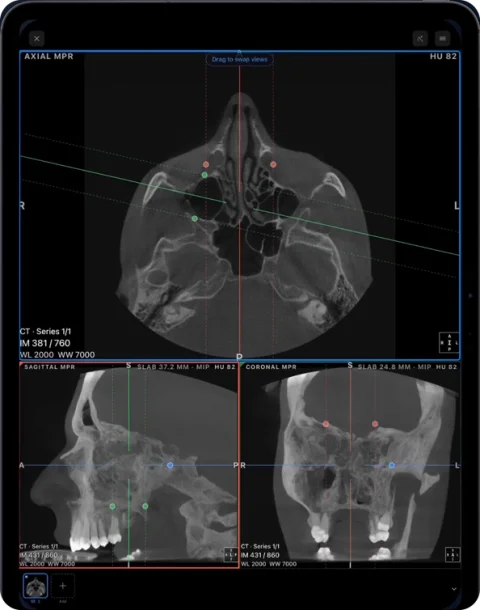
| MPR / 3D | Yes | Yes (Pro): linked MPR, oblique, slab; 3D volume rendering |
| Fusion (PET-CT/MR) | Yes | No |
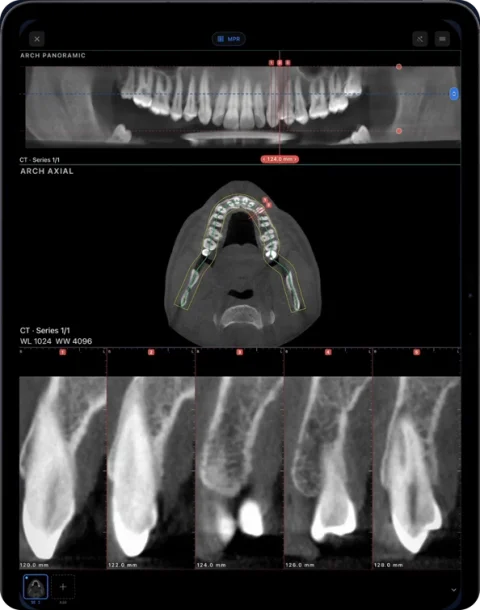
| Dental panoramic arch | Not listed | Panoramic arch with cross-sections, tooth numbering (Pro) |
| NIfTI | Not listed | Yes (.nii, .nii.gz), with segmentation masks as layers |
| PACS | DIMSE (C-FIND/MOVE/GET/STORE) and DICOMweb | DICOMweb (QIDO-RS / WADO-RS); 3 free downloads, unlimited in Pro |
| Measurements / report | Measurements, video export | Length, angle, ROI/HU, annotations; PDF report |
| Privacy | Local desktop program | On-device; no account; images not uploaded to Ossidex servers |
Checked: September 2026, on the vendor sites and the US App Store (sources below). Prices are as listed on the vendor site, September 2026, and may change.
When to keep using MicroDicom
- You read studies on a Windows PC and want a free, fast desktop viewer.
- You need PET-CT or PET-MR fusion, video export, or a traditional DIMSE PACS workflow (C-MOVE, C-STORE).
- You burn discs for patients and want a viewer that starts from the disc on Windows.
Nothing on this page is meant to talk you out of a tool that works. Many people use both: MicroDicom at the desk, a mobile viewer everywhere else.
When Ossidex fits better
- You are on an iPhone, iPad or Mac and there is no Windows PC around. Ossidex is native to iPhone and iPad; nothing to emulate.
- A patient brings a disc to the consultation. Copy the disc folder and open it on the iPad in front of them instead of looking for a PC with a disc drive.
- Studies arrive as links or archives — a WeTransfer, Google Drive or Dropbox link, or a ZIP or RAR in a messenger. Ossidex downloads and unpacks them itself.
- You work with dental CBCT and want a panoramic arch with cross-sections, not only MPR.
- Privacy matters: studies are processed on the device, with no account.
How to move a study from a Windows PC to your iPad
- Export or copy the study. In MicroDicom, export the study as DICOM to a folder, or simply copy the folder you already opened (for a disc, copy the whole disc, not only the viewer program).
- Get the folder onto the iPad or iPhone. Zip the folder and send it with AirDrop (from a Mac), save it to iCloud Drive, Google Drive, Dropbox or OneDrive, or copy it to a USB-C drive and plug the drive into the iPad.
- Import in Ossidex. Open Ossidex, tap the import button and choose the folder or ZIP in the Files picker. For a cloud share link, paste the link instead. Ossidex finds every study and series, including DICOMDIR discs.
- Read the study. Scroll slices in 2D, adjust window/level and measure. With Pro, switch to MPR, 3D or the dental panoramic arch. The study stays on the device and opens offline.
Tip: on a clinic disc, copy everything — the DICOMDIR file and the image folders. The MicroDicom .exe on the disc is only a Windows viewer; Ossidex does not need it. More in discs that come with an .exe viewer.
What is free
MicroDicom is free for non-commercial use on Windows. Ossidex is free on iPhone and iPad for imports, 2D viewing and measurements; MPR, 3D and the dental arch are Pro (pricing).
Frequently asked questions
Is there a MicroDicom app for iPhone or iPad?
We did not find one in the App Store (September 2026). To open DICOM on iPhone or iPad, use a native iOS viewer such as Ossidex.
Does MicroDicom run on a Mac?
Not natively. MicroDicom offers a macOS package based on Wine, a Windows compatibility layer. Native Mac alternatives include Horos, Weasis and OsiriX.
Can Ossidex open the disc that came with MicroDicom on it?
Yes. The images on such discs are standard DICOM. Copy the whole disc folder to the Files app and import it; Ossidex ignores the Windows viewer files.
Is Ossidex free like MicroDicom?
The download, imports, 2D viewing and measurements are free. MPR, 3D, the dental arch and multi-panel layouts on your own studies need Pro.
Does Ossidex support PACS like MicroDicom?
Ossidex supports DICOMweb (QIDO-RS search and WADO-RS download). It does not act as a DIMSE node (C-MOVE/C-STORE) the way MicroDicom does.
Sources
Related pages
Best DICOM viewers 2026
14 desktop, web and mobile DICOM viewers compared: platforms, price, open source, offline use, PACS and iPad.
RadiAnt alternative for Mac, iPhone and iPad
RadiAnt DICOM Viewer runs on Windows only; Mac needs CrossOver or Wine. Ossidex opens CT, CBCT and MRI natively on iPhone and iPad. Fair comparison, 2026.
Bee DICOM Viewer alternative for iPhone and iPad
Bee DICOM Viewer is a free Windows and Mac desktop app with no iPhone or iPad version. Ossidex opens CT, CBCT and MRI natively on iOS. Comparison, 2026.
Open a DICOM CD on iPhone or iPad
Open a CT, MRI or CBCT disc from a hospital or dental clinic on iPhone or iPad: copy the disc folder, import it in Ossidex, and skip the Windows viewer.
Disc with only a Windows .exe viewer
Dental and hospital discs often ship a Windows-only viewer. The images next to it are standard DICOM — copy the whole folder and open it on iPad, iPhone or Mac.
Free DICOM viewer for iPhone and iPad: what’s free, what’s Pro
Ossidex is free to download: import any CT, CBCT or MRI study, view it in 2D and measure. Here is exactly what is free and what Pro adds — no surprises.