
Roundup
Best DICOM viewers in 2026: 14 desktop, web and mobile options
For desktop work in 2026 the established DICOM viewers are OsiriX MD (Mac, paid), Horos (Mac, free), RadiAnt (Windows, subscription), MicroDicom (Windows, free for non-commercial use), Weasis (Windows, Mac and Linux, free) and 3D Slicer (free, research-oriented). In a browser, OHIF, IMAIOS and DocOrbit need no installation. On iPhone or iPad without a laptop, Ossidex (formerly MedScan) is a native option — no laptop needed.
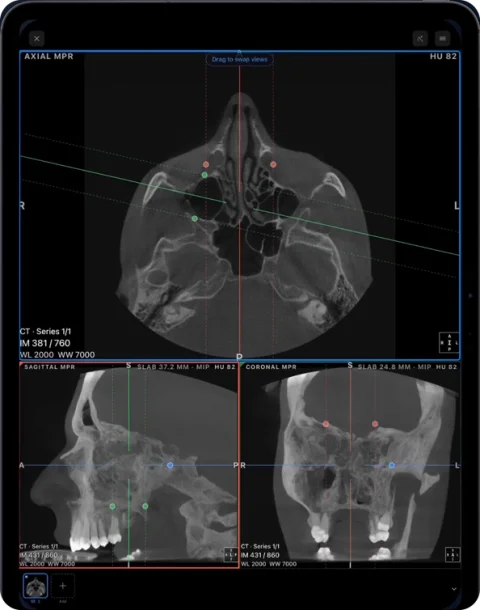
Best for… (short answer)
- Best free viewer on a Mac: Horos.
- Best free viewer on Windows: MicroDicom (non-commercial use).
- Best cross-platform desktop viewer: Weasis.
- Best for research, segmentation and 3D analysis: 3D Slicer.
- Best in a browser: OHIF for institutions with a DICOMweb archive; IMAIOS or DocOrbit for a single study on your own computer.
- Best on iPhone and iPad, no laptop needed: Ossidex.
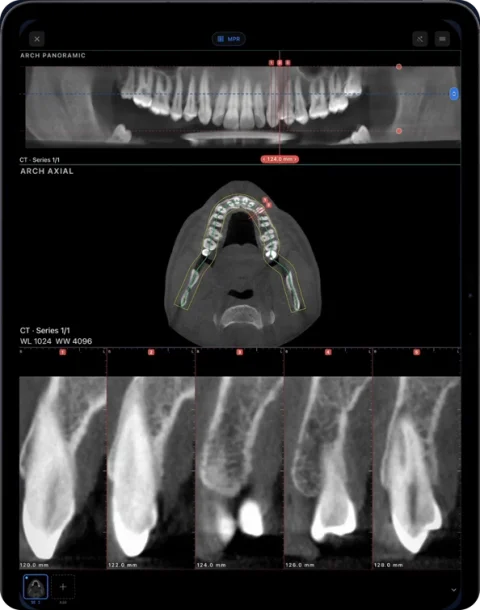
- Best for dental CBCT on an iPad: Ossidex, with a panoramic arch and cross-sections.
We make Ossidex, so weigh the last two lines accordingly — the table below lets you check every claim.
Comparison table (checked September 27, 2026)
| Viewer | Platform | Price model | Open source | Offline | PACS | MPR / 3D | iPhone / iPad |
|---|---|---|---|---|---|---|---|
| OsiriX MD | macOS | Paid, from $69.99/month | No | Yes | Full DICOM networking | Yes / Yes | OsiriX HD, a separate iOS app last updated in 2023 |
| Horos | macOS | Free (LGPL-3.0) | Yes | Yes | Yes | Yes / Yes | Horos Mobile (Falcon Mx) by project partner iCat Solutions |
| RadiAnt | Windows | €5/month or €39/year | No | Yes | Query/retrieve | Yes / Yes | No |
| MicroDicom | Windows | Free non-commercial; $99 commercial | No | Yes | DIMSE and DICOMweb | Yes / Yes | No |
| Weasis | Windows, macOS, Linux | Free | Yes (EPL 2.0 / Apache 2.0) | Yes | DIMSE and DICOMweb | Yes / Yes | No |
| 3D Slicer | Windows, macOS, Linux | Free (BSD-style licence) | Yes | Yes | DICOM module | Yes / Yes, plus segmentation | No |
| Sante DICOM Viewer Pro | Windows | $280 perpetual licence; 90-day demo | No | Yes | Full DIMSE client | Yes / Yes | No |
| Aliza MS | Linux, FreeBSD (commercial edition for Windows and Mac) | Free | Yes | Yes | Not listed | 2D / 3D views, fusion | No |
| OHIF | Web browser | Free (MIT) | Yes | Needs a server | DICOMweb | Yes / Yes | Runs in the browser |
| IMAIOS DICOM Viewer | Web, iOS, Android | Free for personal and non-commercial use | No | Files processed locally | Not listed | MPR | Yes (IDV app) |
| DocOrbit viewer | Web browser | Free | No | Files processed locally in the browser | No | 2D | Runs in the browser |
| PostDICOM | Web (cloud PACS) | Paid plans, 7-day trial | No | No — files stored in the cloud | Cloud PACS | See vendor | Runs in the browser |
| Falcon Mx (Horos Mobile) | iPhone, iPad | Free download | No | Yes | DICOM nodes | Yes / Yes | Native app (iOS 26+) |
| Ossidex | iPhone, iPad | Free download; Pro subscription | No | Yes | DICOMweb | Yes / Yes (Pro) | Native app (iOS 17+), dental arch |
Prices and features as listed on each vendor’s site or App Store page on September 27, 2026. “Not listed” means we found no public statement, not that the feature is missing.
Among the viewers compared here, Ossidex is the only one built natively for iPhone and iPad that also reconstructs a dental panoramic arch from any vendor’s CBCT.
How we evaluated
Disclosure: this page is written by the Ossidex team. We list facts we could check on the vendors’ own pages and App Store listings on September 27, 2026, link every source below, and say where another viewer is the better choice. See our editorial policy.
- Platform: where it runs natively, without emulation.
- Price model: free, freemium, subscription or perpetual licence, as listed by the vendor.
- Open source: whether the code is published under an open licence.
- Offline use: whether studies open without a server or internet connection.
- PACS: DICOM networking (DIMSE) or DICOMweb, as documented.
- Mobile: whether there is a current native iPhone or iPad app.
Desktop viewers
OsiriX MD — Mac
A long-standing macOS workstation with MPR, volume rendering, curved MPR, PET-CT, PACS and plugins. For OsiriX MD, the vendor states FDA Class II and CE Class IIa clearance. The free OsiriX Lite has limits. For: radiologists and clinics on Mac who want a full desktop workstation. OsiriX alternatives.
Horos — Mac, free
An open-source viewer derived from OsiriX, free under LGPL-3.0, with MPR and 3D, supporting Apple silicon. Its iOS counterpart, Horos Mobile, is published in the App Store as Falcon Mx by iCat Solutions, which the Horos Project describes as its partner. For: Mac users who want a free desktop viewer. Horos on iPad.
RadiAnt — Windows
A fast Windows viewer with MPR, 3D, PACS query/retrieve, fusion and a CD/DVD edition. Sold by subscription since 2021; no native Mac version (the vendor documents running it via CrossOver or Wine). For: Windows users who want speed and a polished UI. RadiAnt alternatives for Mac.
MicroDicom — Windows, free for non-commercial use
A Windows viewer with MPR, 3D, PACS client and a portable edition that runs from patient discs. For: quick free viewing on Windows PCs. MicroDicom alternatives.
Weasis — cross-platform, free
An open-source viewer for Windows, macOS and Linux, used in hospital portals, with MPR, 3D, DICOMweb and DIMSE. For: institutions and users on mixed platforms. Weasis on iPhone and iPad.
3D Slicer — Windows, Mac, Linux, free
Free, open-source software for visualisation, segmentation, registration and analysis of medical images, with DICOM import and export, volume rendering, Python scripting and more than 150 extensions. The stable release when we checked was 5.12.4 (September 2026). For: researchers, engineers and anyone who needs segmentation or 3D analysis rather than quick viewing.
Sante DICOM Viewer Pro — Windows
A commercial Windows viewer with MPR and 3D, a full PACS client (C-FIND, C-MOVE, C-STORE, C-GET), a mini PACS server and CD/DVD burning with a viewer. Sold as a perpetual licence ($280 per user, as listed September 2026) with a 90-day demo. For: Windows practices that prefer a one-off licence.
Aliza MS — Linux, free
An open-source viewer for Linux and FreeBSD with 2D and 3D views, fusion, PET SUV, registration and NIfTI import; a separate commercial edition runs on Windows, macOS and Linux. For: Linux users and research groups.
Web viewers
OHIF is a free, open-source, zero-install viewer that runs in the browser and connects to a DICOMweb server; it supports MPR, 3D, segmentation and PET/CT. It suits institutions that host their own archive (OHIF vs a native app). IMAIOS DICOM Viewer and DocOrbit open a study on your own computer in the browser and state that files are processed locally, not uploaded. PostDICOM is a cloud PACS: studies are uploaded and stored on its servers, which suits sharing but not offline or private viewing. Which to use when — and what uploading means for privacy — is covered in online DICOM viewer vs app.
Without a laptop: on iPhone or iPad
Open CT, dental CBCT and MRI from any scanner on the iPhone or iPad you already carry — no laptop needed. None of the desktop viewers above has a current native iPhone/iPad version, except Horos through its partner app Falcon Mx. Ossidex (called MedScan until September 2026) is a native iOS and iPadOS app that:
- imports clinic disc folders, DICOMDIR, ZIP/RAR/7z/ISO archives, NIfTI and cloud links (Google Drive, Dropbox, OneDrive, iCloud Drive, WeTransfer);
- shows 2D with window/level and measurements for free, and MPR, 3D, multi-panel and a dental panoramic arch with Pro;
- connects to PACS via DICOMweb;
- processes images on the device, with no account.
Looking for an iPad or iPhone app specifically? Ten mobile apps — IMAIOS, OsiriX HD, Falcon Mx, 3DICOM Mobile, LumaDICOM, Dicom Viewer by The IT Crowd, MedFilm, mRay, Mobile MIM and Ossidex — are compared in best DICOM viewer apps for iPad and iPhone.
How to choose
- Free on a Mac: Horos or Weasis; 3D Slicer for research.
- Windows workstation: RadiAnt (subscription), Sante (perpetual licence) or MicroDicom (free non-commercial).
- Institution with its own archive, browser access: OHIF.
- One study on a borrowed computer, nothing to install: a browser viewer that processes files locally.
- Phone or tablet, away from the desk, dental CBCT at the chair: Ossidex.
Frequently asked questions
What is the best free DICOM viewer?
On Mac, Horos and Weasis are free and open source. On Windows, MicroDicom is free for non-commercial use and Weasis is free. 3D Slicer is free on all three desktop systems. OHIF is a free web viewer. On iPhone and iPad, Ossidex is free to download with 2D viewing and measurements.
Is there RadiAnt or MicroDicom for Mac?
Neither has a native Mac version; both can be run through Wine or CrossOver with limitations. Native Mac options include OsiriX, Horos, Weasis and 3D Slicer.
Is 3D Slicer a DICOM viewer?
It opens DICOM, but it is a research platform for segmentation, registration and 3D analysis. For quick viewing of a disc, a dedicated viewer is simpler.
Which viewer is best for dental CBCT?
Vendor software (Romexis, Sidexis, CS 3D Imaging, Ez3D-i) is designed for its own scanners on desktop. For any vendor’s DICOM on an iPad, Ossidex offers a panoramic arch with cross-sections.
Can I view DICOM online without installing anything?
Yes. Browser viewers such as IMAIOS, DocOrbit and DicomViewer.net open files on your computer without installation and say they process them locally; cloud platforms such as PostDICOM upload them.
Sources
Related pages
Best DICOM viewer apps for iPad and iPhone
Ten iOS DICOM apps compared: imports, offline use, MPR/3D, dental tools, last update and ratings.
Online DICOM viewer vs app
Browser viewers compared, what uploading means for privacy, and when an app is the better tool.
MicroDicom alternative for Mac, iPhone and iPad
MicroDicom is a Windows DICOM viewer with no native Mac or iOS version. Ossidex opens the same studies on iPhone and iPad. Honest comparison, checked 2026.
RadiAnt alternative for Mac, iPhone and iPad
RadiAnt DICOM Viewer runs on Windows only; Mac needs CrossOver or Wine. Ossidex opens CT, CBCT and MRI natively on iPhone and iPad. Fair comparison, 2026.
Free DICOM viewer for iPhone and iPad: what’s free, what’s Pro
Ossidex is free to download: import any CT, CBCT or MRI study, view it in 2D and measure. Here is exactly what is free and what Pro adds — no surprises.
Compare DICOM viewers: Ossidex vs desktop and mobile alternatives
How Ossidex, an iPhone and iPad DICOM viewer, compares with MicroDicom, RadiAnt, Weasis, Horos, OsiriX, 3DICOM, IMAIOS, OHIF and other viewers.