
Features
Ossidex features: a full DICOM viewer on iPhone and iPad
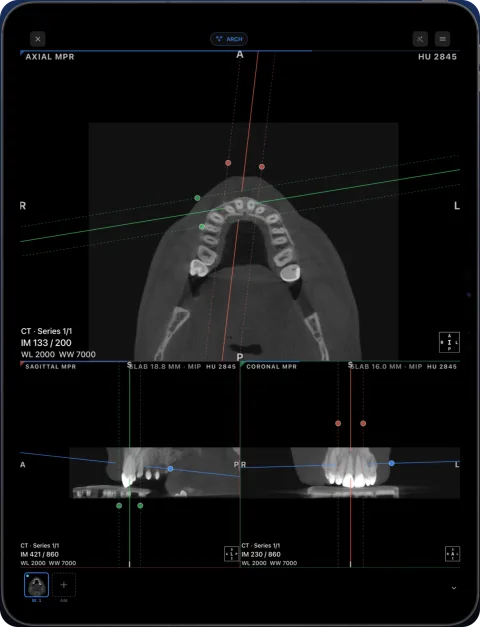
Ossidex turns an iPhone or iPad into a DICOM workstation you can carry: it imports discs, archives and cloud links, then shows CT, CBCT and MRI in 2D, MPR and 3D, builds a dental panoramic arch with cross-sections, and measures in millimetres and Hounsfield units — all processed on the device.
At a glance
| Area | What you get | Plan |
|---|---|---|
| Import | Disc folders, DICOMDIR, ZIP/RAR/7z/ISO, NIfTI, cloud links, PACS (DICOMweb) | Free (PACS: 3 studies free) |
| 2D viewing | Slice scrolling, zoom/pan, window/level presets, cine, series thumbnails | Free |
| Measurements | Length, angle, ROI with HU statistics, HU probe, arrows, text, freehand | Free in 2D |
| MPR | Axial/sagittal/coronal with linked crosshairs, oblique planes, slab MIP | Pro |
| 3D | Volume rendering with presets and clipping | Pro |
| Dental arch | Editable arch, live panorama, cross-sections, tooth numbering | Pro |
| Layouts | Multi-panel, linked MRI windows, drag views into place | Pro |
| Export | Images, PDF report, anonymized export | Free up to 5 studies, then Pro |
Try every Pro tool on the built-in sample CBCT. Free vs Pro.
Feature details
Dental panoramic arch and cross-sections from any CBCT
Trace the dental arch on a CBCT and get a live panorama with numbered cross-sections, tooth numbering, HU probe and a PDF report — on iPad and iPhone.
MPR and 3D volume rendering on iPhone and iPad
Multi-planar reconstruction with linked crosshairs, oblique planes and slab MIP, plus 3D volume rendering with presets and clipping, for CT, CBCT and MRI.
DICOM measurements and PDF reports on iPhone and iPad
Measure length, angles and Hounsfield units on CT, CBCT and MRI in Ossidex, annotate the view, and export an image or a one-page PDF report, anonymized.
Cloud-link import: providers and limits
Which share links Ossidex imports — Google Drive, Dropbox, OneDrive, iCloud Drive, WeTransfer, Yandex Disk, Mail.ru — how downloads resume, what won’t work.
Mobile PACS viewer: connect iPhone and iPad via DICOMweb
Connect Ossidex to your PACS over DICOMweb: search studies with QIDO-RS, download with WADO-RS, Basic or OAuth sign-in stored in the Keychain.
Offline, on-device DICOM viewer: your scans never leave the device
Ossidex opens and renders scans on your iPhone or iPad. No account, no upload of images to our servers, offline viewing, anonymized export when you share.
Frequently asked questions
Does Ossidex work offline?
Yes. After a study is imported, viewing, MPR, 3D and measurements work without a connection.
Does it support iPad multitasking?
Yes. Ossidex runs in Split View and adapts the panel layout to the window shape.
Related pages
Supported formats: every DICOM file, disc and archive Ossidex opens
Full list of what Ossidex opens on iPhone and iPad: DICOM, DICOMDIR, Enhanced multi-frame, NIfTI, JPEG 2000/HTJ2K/JPEG-LS, ZIP, RAR, 7z, ISO and more.
Dental CBCT viewer
Panoramic arch, cross-sections, MPR and 3D for cone beam CT from any scanner.
Ossidex pricing: free to view, Pro for MPR, 3D and the arch
Ossidex is free to download with 2D viewing and measurements. Pro is an optional auto-renewing subscription that adds MPR, 3D, the panoramic arch and more.
How Ossidex reads and renders DICOM on iPhone and iPad
How Ossidex decodes DICOM, JPEG 2000 and HTJ2K, rebuilds volumes for MPR and 3D, and renders them with Metal on iPhone and iPad — all on the device.