
Guides
DICOM guides: open, view and understand medical scans
Start with what you have: a disc, a USB drive, an export from the clinic or an MRI you want to explore. Follow the steps, then check the troubleshooting notes if the study looks incomplete.
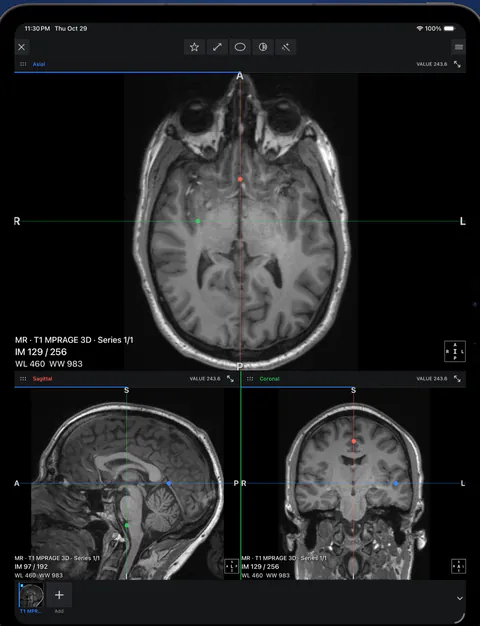 rtAttenPenn · Zenodo 3873446 · CC BY 4.0
Four practical starting points
Where to start
If you have a disc from a hospital or dental clinic, start with how to open a DICOM CD on iPhone or iPad. If someone sent you a link, see opening a scan from a cloud link; if it arrived in WhatsApp or Telegram, see opening a scan sent by messenger. If you already tried and it failed, go to study won’t open.
Ossidex is an app for iPhone and iPad (iOS and iPadOS 17 or later), downloaded from the App Store.
Details: More about this workflow
Step-by-step guides for getting a scan off a disc, an email or a share link and onto an iPhone or iPad, reading CT, MRI and dental CBCT in a viewer, and fixing the problems people run into most. Each guide is written for the Ossidex app but explains the underlying DICOM concepts for any viewer.
All guides
Open a DICOM CD on iPhone or iPad
Open a clinic’s DICOM study on iPhone or iPad from USB, a folder or a link. Learn what to request, how to import it and which viewing tools to use.
Open DICOM files on iPhone
Open .dcm and other DICOM files on iPhone from Mail, AirDrop, iCloud Drive or the Files app with Ossidex, a DICOM viewer for iPhone and iPad.
DICOM viewer without a computer: review CT and CBCT on an iPad
Can you review a CT or dental CBCT on an iPad instead of carrying a laptop? What works without a computer, how to get the files on the device, and the limits.
Open a scan sent by WhatsApp or Telegram
Got a CT, MRI or CBCT in WhatsApp or Telegram? Share the document or ZIP to Ossidex on iPhone or iPad, or save it to Files first. Size limits and fixes.
View MRI scans on your phone
Explore the built-in brain MRI demo in Ossidex 2.0, then open your own study. Understand series, MPR, viewing tools and sample studies and what images cannot tell you.
Show a CBCT to the patient chairside on iPad
Prepare a CBCT in Ossidex before the visit, orient the patient with the panorama, show a cross-section and share a report. Includes Pro and privacy limits.
View CT scans on iPhone and iPad
View CT scans on iPhone or iPad: import the disc or link, use Hounsfield-based window presets for bone, soft tissue and lung, and switch to MPR and 3D.
Online DICOM viewer vs app
Browser viewers compared, what uploading means for privacy, and when an app is the better tool.
Best DICOM viewer apps for iPad and iPhone
Ten iOS DICOM apps compared: imports, offline use, MPR/3D, dental tools, last update and ratings.
Open a scan from a cloud link
Open a CT, MRI or CBCT shared via Google Drive, Dropbox, OneDrive, WeTransfer or iCloud on iPhone or iPad: paste the link in Ossidex to download it.
How to read a CBCT scan
Navigate a dental CBCT: axial, coronal and sagittal planes, panoramic reconstruction, cross-sections, window/level and common artifacts explained.
Panoramic X-ray vs CBCT
How a dental panoramic X-ray (OPG) differs from a CBCT: 2D projection vs 3D volume, distortion and magnification, and what each is typically used for.
Misch bone density D1–D4
The Misch D1–D4 bone density classes, the Hounsfield ranges usually quoted for them, and why CBCT gray values are only relative, not true HU.
Reviewing a CBCT before an implant
Before an implant, review CBCT arch views, cross-sections, ridge dimensions, canal and sinus proximity, then plan it in the Ossidex app on iPhone or iPad.
Carestream, Sidexis and Romexis exports
Bring Carestream CS 3D, Sidexis or Romexis scans to Ossidex on iPad. Follow vendor export steps and learn which images and plans transfer.
Study won’t open: fixes
Fixes for DICOM studies that will not open: incomplete downloads, only the viewer copied, proprietary files, password archives, portal links, memory.
How to move a DICOM study from iPhone to iPad
Move a complete DICOM folder or ZIP to your iPad, import it into Ossidex and verify it offline. Pro access and the study library are separate.
View the TMJ on a CBCT scan
Corrected sagittal and coronal planes of the condyle, what CBCT cannot show, and when TMJ MRI is needed.
Which CT or CBCT series should you open for MPR?
Identify a compatible volumetric series, separate a scout or panorama from the slice stack, and distinguish incomplete data from Pro access.
How to share a DICOM study or PDF without the patient name
Choose between a PDF report and an anonymized DICOM copy, inspect the exported images and metadata, then share through an appropriate channel.
How to connect an iPhone or iPad to a DICOMweb PACS
Get the DICOMweb server and path from your administrator, configure authentication, search with QIDO and download with WADO in Ossidex.
How to open a Romexis Viewer disc on a Mac
Find the Mac launcher or open the DICOM export from a Romexis disc. Keep the image files together when moving the scan to an iPad.
How to open an NNT Viewer scan on Mac without Windows
Check whether your NewTom package contains DICOM images or only NNT Viewer data, then open the export on Mac or transfer it to iPad.
ViewData.exe will not open on Mac: how to get the scan
ViewData.exe launches Carestream’s Windows viewer. Find the Data folder, preserve the complete export and request DICOM when necessary.
How to open a Sidexis 4 Viewer disc on Mac or iPad
Distinguish a Sidexis 4 Viewer package from a DICOM export or Galileos volume. Find out which files to request when the Windows launcher fails.
How to open .inv and .apj scan files on iPhone, iPad or Mac
Learn why InVivo .inv and .apj files are not interchangeable with DICOM, which source files an APJ needs, and what to request from the clinic.
DICOMDIR opens but shows no images: what to do
Fix an empty DICOMDIR import by restoring the referenced image files and selecting the whole disc folder on iPhone, iPad or Mac.
How to open DICOM files without a .dcm extension
Scan discs can contain extensionless image files. Import the full folder, preserve the names and distinguish images from the DICOMDIR index.
What is the DICOMRM folder and how do I open it?
DICOMRM can hold images from a Sidexis or Galaxis export. Keep it with DICOMDIR and import their parent folder instead of renaming the files.
A .dcm file shows as unknown on iPhone: how to open it
A blank preview in Files does not prove a DCM file is damaged. Import it through Files / ZIP in Ossidex and check whether it is one slice or a volume.
How to open a CT scan ZIP from a patient portal on iPhone
Download the image archive from your patient portal, save it to Files and import the complete CT examination in Ossidex on iPhone or iPad.
My DICOM link opens a web page instead of a scan
Resolve portal and sign-in links that return HTML instead of DICOM. Download the actual study in your browser, then import it from Files.
How to open a password-protected DICOM ZIP on iPhone
Import an encrypted scan archive in Ossidex, use the sender’s archive password and distinguish encryption from a damaged or unsupported ZIP.
A DICOM ZIP is incomplete or stops extracting: what to do
Distinguish a partial download from a split archive or an unsupported format. Recover the full image set before relying on an imported study.
How to open a scan folder with no DICOMDIR file
A missing DICOMDIR does not always prevent viewing. Import the complete image folder and check which series actually arrived.
My DICOM scan shows only one image: where are the other slices?
Check whether you imported one slice, a preview series or a multi-frame DICOM file. Find the complete CT or CBCT volume without guessing by file count.
I received a CT scan as PDF or JPG: can I open it in 3D?
A CT report or screenshot is not the source volume. Learn what you can view and the exact DICOM export to request for slices, MPR and 3D.
DICOM unsupported transfer syntax: how to open the images
Find out why a DICOM file can be recognized but its pixels cannot be decoded, and what to ask for when a viewer rejects the encoding.
How to open a DICOM ISO disc image on iPhone, iPad or Mac
An ISO contains a disc filesystem, not one scan image. Import it in the app or extract the disc folder on a computer while preserving the layout.
How to open Morita CT_0.vol and CtStatus.csv files
Identify the volume on a Morita One Volume Viewer disc, keep its companion CSV and understand orientation limits before importing on iPhone or iPad.
How to open a Galileos .gwg file and its volume folder
Keep the Galileos .gwg file with its neighboring volume folder. Import the full package on iPad and check orientation and resolution limits.
Related pages
Supported formats: DICOM, NIfTI, images, models and archives
Ossidex formats on iPhone and iPad: DICOM CT, MRI, CBCT and ultrasound, NIfTI-1/2, images, PDF, STL/PLY/OBJ models and ZIP, RAR, 7z, ISO archives.
Ossidex features: a full DICOM viewer on iPhone and iPad
Everything Ossidex does: 2D viewing, MPR, 3D rendering, a dental panoramic arch, measurements and PDF reports, cloud-link and PACS import, on-device privacy.
Dental CBCT viewer
Panoramic arch, cross-sections, MPR and 3D for cone beam CT from any scanner.
Ossidex FAQ: DICOM viewing on iPhone and iPad
Answers about Ossidex: supported files, opening clinic discs and cloud links, dental CBCT, privacy, pricing, languages and Mac.