
Practical guide
Which CT or CBCT series should you open for MPR?
For MPR, choose a compatible series with spatially ordered slices or frames that form a volume. A scout, panoramic image, screenshot or report is not a substitute for the volume. A DICOM extension alone does not prove that a series can be reconstructed. Pro access and usable image geometry are separate requirements.
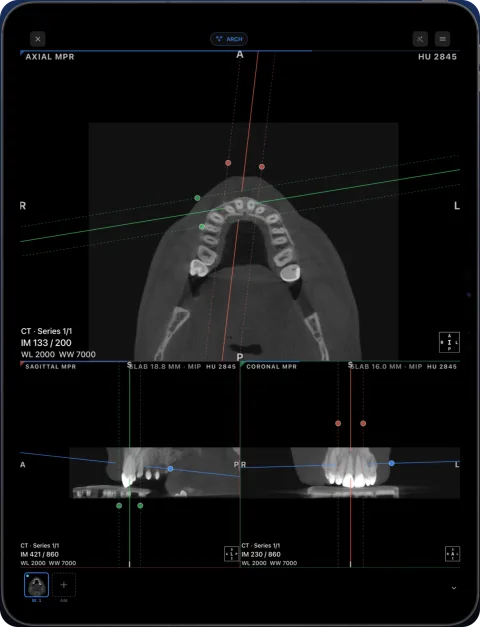
Choose the series, then check the volume
- Import every image folder. Use the clinic’s complete DICOM export. A selected subset of files may omit most of the slices even though a few images open.
- Select the volumetric acquisition. Review the series descriptions and images. A long CT/CBCT slice stack is a better candidate than a scout or rendered panorama; descriptions alone are not proof. Enhanced DICOM may contain many frames in one file.
- Wait for preparation. Open the series and allow it to finish loading before selecting MPR. Large studies take longer and can be limited by device memory.
- Check the other planes. Inspect the original slices and reconstructed planes. If slices are missing or positions appear inconsistent, get a complete export rather than treating interpolation as recovered source data.
Separate the cause from the symptom
| What you see | What to check |
|---|---|
| A Pro purchase prompt | Access to MPR on your own studies. Test the built-in sample; its tools are unlocked. |
| One projection or panorama | Whether the export also contains the original volumetric series. |
| A stack with gaps or inconsistent geometry | Completeness and image positions/orientations; request a corrected export. |
| Loading stops or the study is too large | Available device memory and supported data; try a smaller permitted test volume. |
Geometry matters more than the filename
The DICOM standard describes pixel spacing, image position and image orientation as spatial information. Series reconstruction depends on usable geometry, not simply a .dcm name. Do not combine unrelated acquisitions to manufacture a volume.
Frequently asked questions
Will Pro turn a panoramic X-ray into a CBCT?
No. A subscription unlocks tools; it does not create the missing slice data or 3D acquisition.
Can one DICOM file contain a volume?
Yes, supported Enhanced multi-frame data can store multiple frames in one file. File count alone does not identify a volume.
Sources
Related pages
Enhanced multi-frame DICOM (CT and MR) on iPhone and iPad
Enhanced CT and MR store a whole series in one multi-frame DICOM file. How Ossidex reads per-frame geometry, calibration and 4D series on iPhone and iPad.
MPR and 3D volume rendering on iPhone and iPad
Multi-planar reconstruction with linked crosshairs, oblique planes and slab MIP, plus 3D volume rendering with presets and clipping, for CT, CBCT and MRI.
Dental CBCT viewer
Panoramic arch, cross-sections, MPR and 3D for cone beam CT from any scanner.
Study won’t open: fixes
Fixes for DICOM studies that will not open: incomplete downloads, only the viewer copied, proprietary files, password archives, portal links, memory.
Ossidex app pricing: free to view, Pro for MPR, 3D and the arch
Ossidex is free to download with 2D viewing and measurements. Pro is an optional auto-renewing subscription that adds MPR, 3D, the panoramic arch and more.