
MPR and 3D
MPR and 3D volume rendering on iPhone and iPad
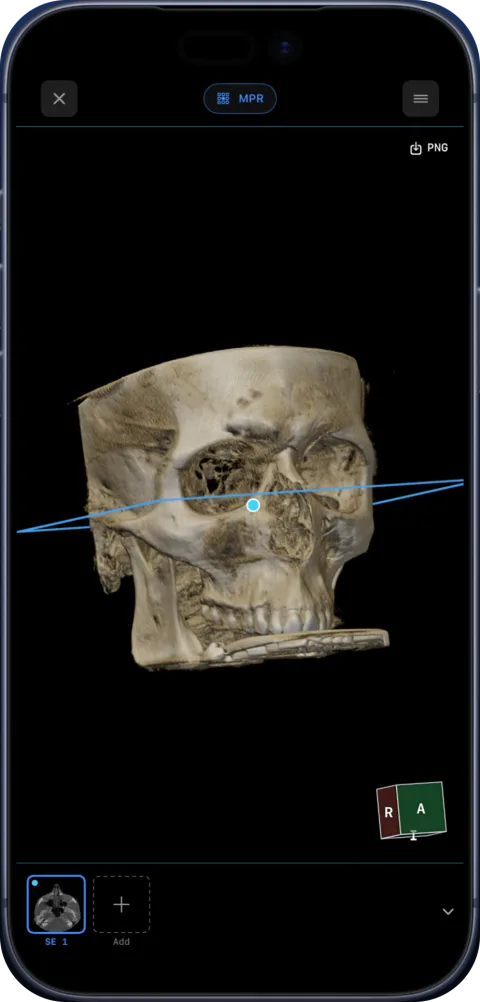
Ossidex rebuilds a CT, CBCT or MRI series into a volume and shows it as axial, sagittal and coronal planes with linked crosshairs, oblique planes and adjustable slab thickness (MIP), plus a 3D volume rendering you can rotate and clip — on iPhone and iPad, without a workstation.
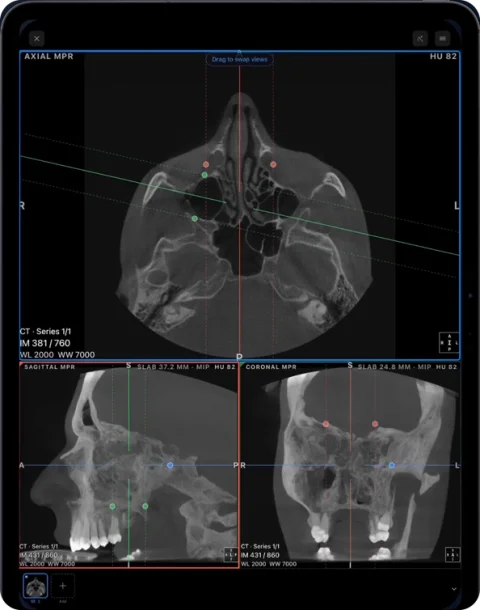
Multi-planar reconstruction
- Three orthogonal planes with colour-coded reference lines; drag a line to move the other planes.
- Tilt planes for oblique views, and set slab thickness for maximum-intensity projection in the same gesture.
- Window/level presets for bone, soft tissue and sinuses, synced across planes.
- Drag a view to any panel to build the layout you want.
3D volume rendering
The 3D view renders the whole volume on the GPU. Rotate and zoom with your fingers, switch presets (bones is the default; teeth and airway are available) and move a clipping plane to look inside. It is useful for orientation, patient explanation and seeing the overall anatomy of a fracture, an impacted tooth or the airway.
Linked series for MRI
Open several MRI series side by side; scrolling one moves the reference lines in the others, so you can follow a structure across sequences.
Requirements
MPR and 3D need a volumetric series — CT, CBCT or 3D MRI with enough slices. Single X-ray images and 2D MRI series with large gaps open in the 2D viewer. MPR and 3D are Pro features on your own studies and free to try on the sample CBCT.
Tips for better reformats
- Thin slices give better MPR. A 0.2–0.4 mm CBCT reformats cleanly in every plane; a CT reconstructed at 5 mm looks blocky in sagittal and coronal views.
- Pick the right series. Many CT studies include both a thick “review” series and a thin reconstruction — open the thin one for MPR and 3D.
- Window before you judge. Bone, soft tissue and sinus presets change what is visible far more than zoom does.
- Use slab sparingly. A thin slab follows a curved root; a thick slab hides small details behind brighter structures.
Using MPR on an iPad
- Open a volumetric series. CT, CBCT or 3D MRI with thin, contiguous slices.
- Switch to MPR. The screen splits into axial, sagittal and coronal views with colour-coded lines.
- Navigate. Drag a reference line to move the other planes, or scroll inside a view to step through slices.
- Tilt and thicken. Rotate a line for an oblique plane; increase slab thickness for a maximum-intensity projection that shows vessels or a curved root in one image.
- Arrange. Drag views into the panels you prefer and adjust window/level once for all planes.
Which mode for which question
| Question | Best view |
|---|---|
| Where exactly is a structure in 3D space? | MPR with linked crosshairs |
| Follow a curved root or canal | Oblique MPR with a thin slab |
| See vessels or dense structures in one image | Thick slab MIP |
| Overall shape of a fracture, impacted tooth or airway | 3D volume with clipping |
| Dental arch overview | Panoramic arch |
Performance
Volumes are built once and cached on the device, so reopening a large CBCT is quick. Rendering runs on the GPU with Apple’s Metal; on recent iPhones and iPads MPR and 3D stay interactive while you drag. Very large multi-series studies are most comfortable on iPads with more memory.
Frequently asked questions
Can I do MPR on an MRI?
Yes, when the series is volumetric (thin, contiguous slices). For typical 2D MRI sequences with thick slices, reformatting is limited by the data itself.
Is 3D rendering slow on an iPhone?
Rendering runs on the GPU and is interactive on recent iPhones and iPads. Very large studies are smoother on iPads with more memory.
Can I export the 3D view?
Yes, as an image. Pro removes the export limit.
Can I try MPR and 3D for free?
Yes, on the built-in sample CBCT, which has every tool unlocked. On your own studies MPR and 3D are part of Pro.
Does 3D work for MRI?
For volumetric MRI series, yes; presets are tuned for CT and CBCT, so adjust window/level for MRI.
Related pages
Dental panoramic arch and cross-sections from any CBCT
Trace the dental arch on a CBCT and get a live panorama with numbered cross-sections, tooth numbering, HU probe and a PDF report — on iPad and iPhone.
View CT scans on iPhone and iPad
View CT scans on iPhone or iPad: import the disc or link, use Hounsfield-based window presets for bone, soft tissue and lung, and switch to MPR and 3D.
View MRI scans on your phone
View MRI scans on iPhone or iPad: import the disc or link, understand series and sequences like T1, T2 and FLAIR, link windows and adjust contrast in Ossidex.
Enhanced multi-frame DICOM (CT and MR) on iPhone and iPad
Enhanced CT and MR store a whole series in one multi-frame DICOM file. How Ossidex reads per-frame geometry, calibration and 4D series on iPhone and iPad.
How Ossidex reads and renders DICOM on iPhone and iPad
How Ossidex decodes DICOM, JPEG 2000 and HTJ2K, rebuilds volumes for MPR and 3D, and renders them with Metal on iPhone and iPad — all on the device.