
Head-to-head
Ossidex vs LumaDICOM: two iPhone and iPad DICOM viewers compared
LumaDICOM and Ossidex are both on-device DICOM viewers for iPhone and iPad with MPR, 3D, a dental panorama, archive import and cloud links. LumaDICOM is free and new (first released May 2026). Ossidex has a free 2D tier and Pro for advanced modes, and adds DICOMweb PACS, NIfTI, DICOMDIR discs, PDF reports and 46 languages.
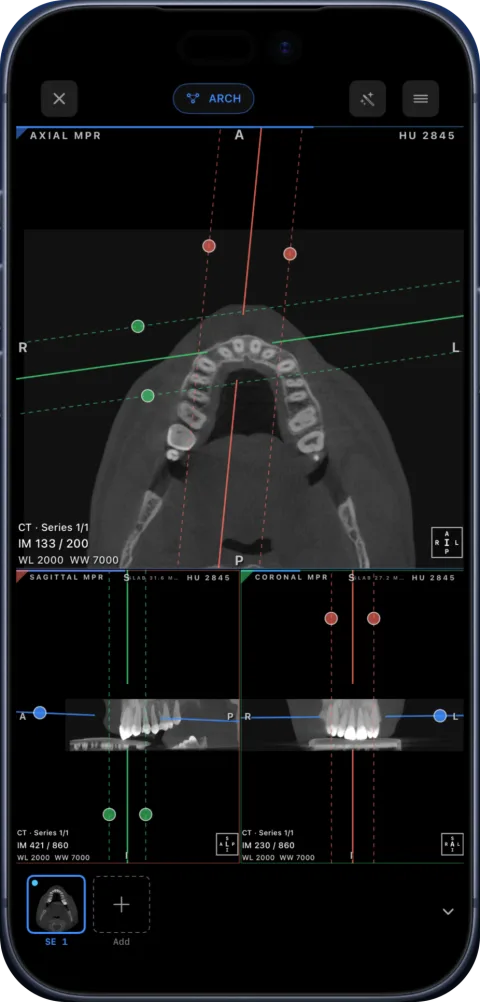
Side by side
| LumaDICOM | Ossidex | |
|---|---|---|
| Platforms | iPhone, iPad | iPhone, iPad (iOS/iPadOS 17+) |
| Price | Free (no in-app purchases detected) | Free download; Pro subscription (monthly or yearly) for MPR, 3D, arch |
| First release / latest | May 2026 / version 1.8.4, September 2026 | April 2026 / version 1.11, September 2026 |
| MPR / 3D | Yes: oblique MPR, slab MIP, 3D with clipping | Yes (Pro): linked MPR, oblique, slab; 3D volume rendering |
| Dental | OPG panoramic reconstruction | Panoramic arch you edit point by point, numbered cross-sections, tooth numbering, arch PDF report |
| Archives | ZIP, RAR, 7z, ISO | ZIP, RAR (incl. RAR5, multi-volume), 7z, TAR/GZ, ISO, password-protected |
| Cloud links | Google Drive, Dropbox, Yandex Disk | Google Drive, Dropbox, OneDrive, iCloud Drive, WeTransfer, Yandex Disk, Mail.ru Cloud, direct URLs |
| NIfTI | Not listed | Yes |
| DICOMDIR / Enhanced multi-frame | Not listed | Yes |
| PACS | Not listed | DICOMweb (QIDO-RS / WADO-RS); 3 free downloads, unlimited in Pro |
| Export | OBJ/STL export | PDF report, images, anonymized DICOM |
| Privacy | On-device (vendor) | On-device; no account; images not uploaded to Ossidex servers |
Checked: September 2026, on the vendor sites and the US App Store (sources below). Prices are as listed on the vendor site, September 2026, and may change.
Where LumaDICOM is better
- It is free, including MPR, 3D and the panorama.
- It exports 3D surfaces as OBJ/STL, which Ossidex does not.
Imports in detail
Both apps accept archives and some cloud links. Ossidex handles these sources:
| What you have | How it gets into Ossidex |
|---|---|
| Disc folder with DICOMDIR | Import the whole folder; the Windows viewer (.exe) next to it is skipped. If you pick the .exe by mistake, Ossidex suggests importing the folder instead. |
| ZIP / RAR / 7z / ISO | Imported as is, archives inside archives unpacked; password asked only for encrypted archives. |
| Cloud share link | Google Drive files and folders, Dropbox, OneDrive and SharePoint, iCloud Drive shared files, WeTransfer, Yandex Disk, Mail.ru Cloud, direct URLs. Interrupted downloads resume. |
| Loose .dcm files | Grouped into studies and series; files without UIDs or without the DICOM preamble are recovered where the data allows. |
| PACS | DICOMweb search (QIDO-RS) and download (WADO-RS). |
LumaDICOM lists ZIP, RAR, 7z and ISO archives and links from Google Drive, Dropbox and Yandex Disk.
Dental workflow compared
LumaDICOM reconstructs an OPG-style panorama from a CBCT. Ossidex’s arch is built for repeated clinical use: an automatic curve you edit point by point (move, insert, delete, extend), a panorama that updates live while you edit, numbered cross-sections along the curve with slice rulers, FDI or Universal tooth numbering, a HU probe with a bone-density guide, one arch per study that reopens where you left off, and a PDF report with the panorama and all cross-sections.
Who should pick which
- You want everything free and need STL/OBJ export: LumaDICOM.
- You connect to a PACS, open NIfTI or DICOMDIR discs, or need PDF reports: Ossidex.
- You work in a language other than English: Ossidex’s interface is available in 46 languages.
Both are free to install; the fastest way to decide is to open the same study in each.
Where Ossidex is different
- PACS connection through DICOMweb.
- NIfTI files, DICOMDIR discs and Enhanced multi-frame CT/MR.
- More link providers: OneDrive, iCloud Drive, WeTransfer and Mail.ru Cloud in addition to Drive, Dropbox and Yandex Disk.
- Measurements with a one-page PDF report and an arch report with all cross-sections.
- An editable arch: move, insert and delete points, with measurements carried over when you edit.
- 46 interface languages.
LumaDICOM is young and changing quickly; we compared against its public site and App Store listing and did not test every feature.
Frequently asked questions
Is LumaDICOM free?
Its App Store listing shows it as free, and we did not detect in-app purchases (September 2026).
Which is better for dental CBCT?
Both reconstruct a panorama. Ossidex adds an editable arch with numbered cross-sections, tooth numbering and an arch PDF report. Try your own scan in both.
Can Ossidex export 3D models like LumaDICOM’s OBJ/STL?
No. Ossidex exports images, PDF reports and anonymized DICOM; for surface models use LumaDICOM or desktop software.
Do both work offline?
Both process studies on the device. Ossidex opens imported studies without a connection.
Which supports more cloud links?
Ossidex lists Google Drive (files and folders), Dropbox, OneDrive and SharePoint, iCloud Drive, WeTransfer, Yandex Disk, Mail.ru Cloud and direct URLs; LumaDICOM lists Google Drive, Dropbox and Yandex Disk.
Sources
Related pages
Best DICOM viewers 2026
14 desktop, web and mobile DICOM viewers compared: platforms, price, open source, offline use, PACS and iPad.
Ossidex vs IMAIOS DICOM Viewer (IDV)
IMAIOS DICOM Viewer is free for personal use on web, iOS and Android. Ossidex adds a dental arch, archives, cloud links and PACS. Where each wins, 2026.
Dental panoramic arch and cross-sections from any CBCT
Trace the dental arch on a CBCT and get a live panorama with numbered cross-sections, tooth numbering, HU probe and a PDF report — on iPad and iPhone.
Cloud-link import: providers and limits
Which share links Ossidex imports — Google Drive, Dropbox, OneDrive, iCloud Drive, WeTransfer, Yandex Disk, Mail.ru — how downloads resume, what won’t work.
Best DICOM viewer apps for iPad and iPhone
Ten iOS DICOM apps compared: imports, offline use, MPR/3D, dental tools, last update and ratings.