
Comparison
Best DICOM viewer apps for iPad and iPhone (2026)
The DICOM viewer apps worth considering on iPad and iPhone in 2026 are Ossidex, IMAIOS DICOM Viewer, Falcon Mx (the app behind Horos Mobile), LumaDICOM, OsiriX HD, 3DICOM Mobile and Dicom Viewer by The IT Crowd; MedFilm, mRay and Mobile MIM serve narrower cases. They differ in how they import studies, whether they work offline, how current they are and whether MPR, 3D and dental tools are included. This page is written by the Ossidex team; every fact was checked on the US App Store and vendor sites on September 27, 2026.
 rtAttenPenn · Zenodo 3873446 · CC BY 4.0
Open DICOM in your browser
The browser viewer offers free 2D and MPR, with a linear ruler in millimetres when valid spatial calibration is available. The ruler is unavailable without valid spacing. Angle measurements, ROI, export, 3D and the dental arch are available in the iPhone/iPad app.
Watch the app workflow
An excerpt from a product recording. See all videos and descriptions. Controls may differ from the current release.
How we compared
Disclosure: Ossidex makes one of the apps below. We list only facts we could check on the App Store and vendors’ own pages on September 27, 2026, and we say where another app is the better choice.
Criteria: how studies get into the app (files, archives, cloud links, network), whether viewing works on the device without an internet connection, 2D/MPR/3D tools, dental features, how recently the app was updated, pricing model and US App Store ratings. Apps with fewer than ten ratings are marked “too few to report”. For desktop and web viewers see best DICOM viewers in 2026.
At a glance
| App | Developer | Price | Last update (US App Store) | US ratings | Offline | MPR / 3D | Dental |
|---|---|---|---|---|---|---|---|
| Ossidex | Ossidex | Built-in samples; App Store terms | v2.0, Oct 31, 2026 | Too few to report | Yes | Yes (Pro) | Panoramic arch, cross-sections, implant planning (Pro) |
| IMAIOS DICOM Viewer (IDV) | IMAIOS | Free for personal / non-commercial use | v3.4.2, Sep 1, 2026 | 4.7 (521) | Files stay on the device | MPR | Not listed |
| Falcon Mx (Horos Mobile) | iCat Solutions | Free download; in-app subscriptions | v27.0.0, Sep 15, 2026 | 4.5 (281) | Yes | Yes / Yes | Not listed |
| LumaDICOM | Pavel Demianov | Free | v1.8.4, Sep 15, 2026 | Too few to report | Yes | Yes / Yes | OPG-style panorama |
| OsiriX HD | Pixmeo | Free | v5.5.6, Aug 28, 2023 | 2.8 (49) | Yes | MPR | Not listed |
| 3DICOM Mobile | Singular Health | Free app; paid platform plans | v3.4.0, Aug 26, 2026 | Too few to report | Needs internet to load scans | 3D focus | Not listed |
| Dicom Viewer by The IT Crowd | The IT Crowd | Free, open source (optional tip) | v2.1, Jul 1, 2026 | Too few to report | Yes | 2D only | No |
| MedFilm | Fuli Wu | Free | v4.25, Jun 1, 2016 | 4.6 (78) | After PACS download | Not listed | No |
| mRay | mbits imaging | Free app; needs an mRay server | v6.14.0, Aug 28, 2026 | Too few to report | Temporary encrypted local copy | Not listed | No |
| Mobile MIM | MIM Software | Free app; data via MIMcloud or MIM software | v4.2.3, May 29, 2024 | 3.1 (18) | After download | Fusion, MIP | No |
Versions, dates, prices and ratings from the US App Store (iTunes Lookup), September 27, 2026. “Not listed” means the App Store listing and vendor site do not mention the feature.
If you receive scans on discs, as ZIP/RAR archives or as Google Drive and WeTransfer links from many clinics, Ossidex and LumaDICOM import these on the device; IMAIOS is the pick if you need the same viewer on Android and the web.
Imports compared
| App | How studies get in |
|---|---|
| Ossidex | Files, AirDrop, Mail and messengers, disc folders with DICOMDIR, ZIP/RAR/7z/ISO (password-protected too), NIfTI, links from Google Drive, Dropbox, OneDrive, iCloud Drive, WeTransfer, Yandex Disk, Mail.ru Cloud, DICOMweb PACS |
| IMAIOS DICOM Viewer | Files on the device (IMAIOS does not publish a full list) |
| Falcon Mx | iCloud Drive, Dropbox and Google Drive; DICOM nodes (PACS); device-to-device over DICOM or Bonjour |
| LumaDICOM | ZIP, RAR, 7z, ISO; links from Google Drive, Dropbox and Yandex Disk |
| OsiriX HD | DICOM networking (C-STORE receiver, C-FIND/MOVE/GET), WADO, DICOMweb |
| 3DICOM Mobile | Scans loaded from the 3DICOM platform |
| Dicom Viewer by The IT Crowd | .dcm files from Files, AirDrop, email or other apps |
| MedFilm | PACS query/retrieve (C-FIND, C-GET, WADO) |
| mRay | An mRay server installed at the hospital or practice |
| Mobile MIM | MIMcloud or MIM workstation software |
Ossidex
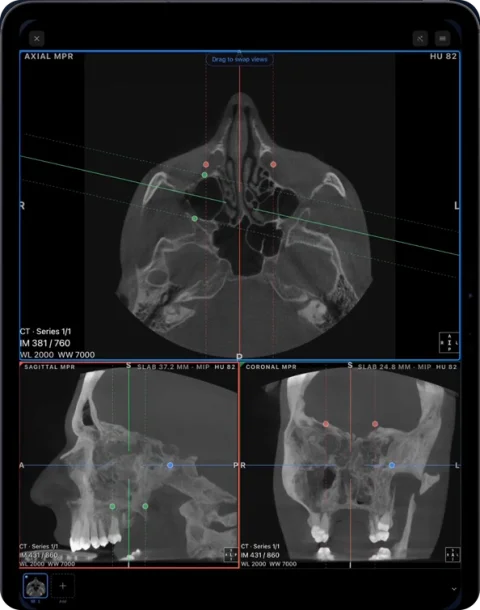
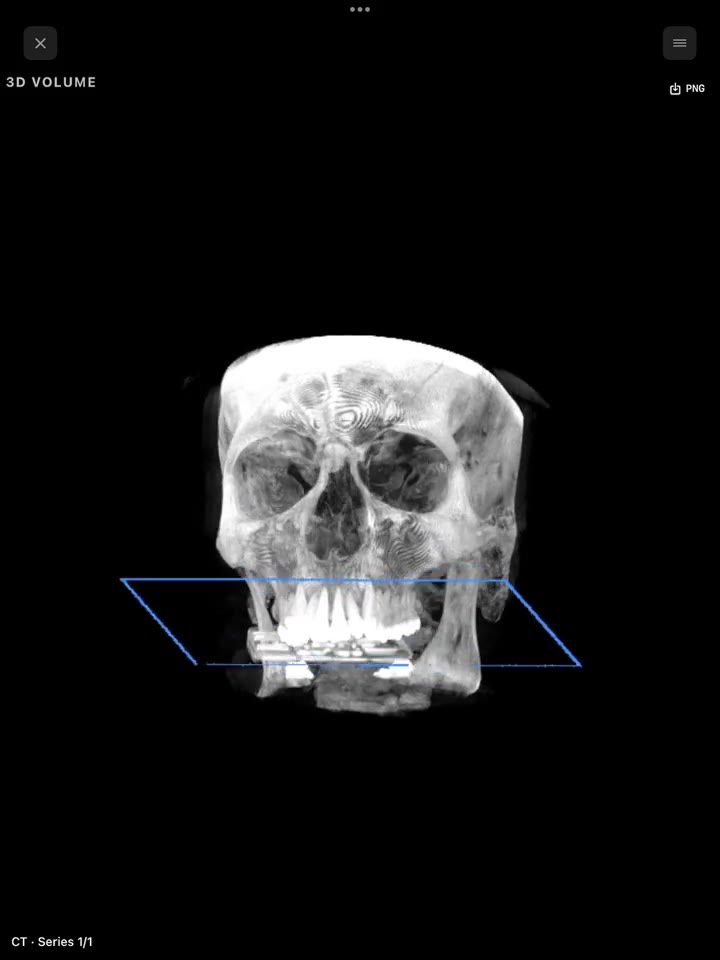
Built for opening real-world discs and archives on the device you carry: disc folders, DICOMDIR, ZIP/RAR/7z/ISO, NIfTI, links from Google Drive, Dropbox, OneDrive, WeTransfer and others, and PACS via DICOMweb. Viewing includes 2D with presets, MPR with slab, 3D volume rendering and a dental panoramic arch with cross-sections and tooth numbering, plus measurements and PDF reports. Processing is on the device with no account. Use 2D viewing and measurements, MPR, 3D and the dental arch on compatible studies. Choose it if you receive scans from many sources, or read dental CBCT — no laptop needed.
IMAIOS DICOM Viewer
From the French medical-education company IMAIOS, available on iOS, Android and the web. The iOS app is the best rated of the group (4.7 from 521 US ratings), keeps files on the device, and recent versions added measurements and video sharing in MPR. It is free for personal and non-commercial use. Choose it if you want the same viewer across iPhone, Android and a browser. Ossidex vs IMAIOS.
Falcon Mx (Horos Mobile)
The Horos Project’s “Horos Mobile” page points to this App Store app, made by iCat Solutions Ltd, which the project describes as its partner. Falcon Mx is free to download with in-app subscriptions and a trial, rated 4.5 from 281 US ratings, updated in September 2026, and requires iOS 26. It offers MPR and 3D volume rendering, split-screen synchronised windows, measurements, anonymisation, DICOM nodes for PACS and imports from iCloud Drive, Dropbox and Google Drive. A sibling app, Falcon MD, is sold by subscription for clinical reading. Choose it if you use Horos on a Mac or push studies from a PACS to the iPad. Falcon Mx vs Ossidex.
LumaDICOM
A newer iPhone and iPad viewer (first released May 2026) that works on the device and offers 2D, MPR with oblique planes and slab MIP, 3D with clipping, a dental panoramic reconstruction and OBJ/STL export. It opens ZIP/RAR/7z/ISO and links from Google Drive, Dropbox and Yandex Disk. Choose it if you want a free app with a similar feature set and STL export. Ossidex vs LumaDICOM.
OsiriX HD
The iOS companion to OsiriX MD for Mac, from Pixmeo. It is free and has the most complete classic DICOM networking of the group (C-STORE, C-FIND/MOVE/GET, WADO, DICOMweb) and MPR. The vendor notes that images are downsampled to 1536×1536. The last update was in August 2023. Choose it if you already work with OsiriX on a Mac and a PACS. OsiriX HD vs Ossidex.
3DICOM Mobile
From Singular Health, the mobile client of the 3DICOM platform (web, desktop, iOS, Android). It centres on 3D visualisation and sharing; the app needs an internet connection to load scans. Advanced platform features come with paid plans. Choose it if 3D presentation and cloud sharing matter more than offline use. 3DICOM alternative.
Dicom Viewer by The IT Crowd
A free, open-source viewer that shows DICOM X-ray, CT, MRI and ultrasound on the device, with no account and no upload. It opens .dcm files from Files, AirDrop and email, groups slices into series, plays multi-frame studies as cine, offers window/level presets and exports frames as PNG or JPEG. There is no MPR or 3D. Choose it if you want a simple, free 2D viewer for a few files.
MedFilm, mRay and Mobile MIM
MedFilm is a free viewer that retrieves studies from a PACS with C-FIND, C-GET and WADO; its last update was in June 2016, so expect it to lag behind current iOS versions. mRay (mbits imaging) connects a hospital or practice through its own server and adds a secure messenger for case discussion — it needs that server installed, so it is an institutional tool rather than one for a single disc. Mobile MIM (MIM Software) shows images, fusion and radiotherapy plans transferred from MIMcloud or MIM workstation software; its last update was in May 2024. Choose one of these if your institution already runs the matching infrastructure.
iPhone vs iPad: what changes
All ten apps run on both iPhone and iPad (Falcon Mx needs iOS 26). The difference is the screen. An iPhone is fine for checking a study, scrolling a series and showing a finding to someone next to you. An iPad is better for anything with several views at once: three-plane MPR, a dental panorama with a row of cross-sections, or two MRI series side by side, because every panel stays large enough to see detail. If you mainly receive files on your phone, import them there — in Ossidex a study imported on the iPhone opens the same way on an iPad after you move the file.
Which one should you pick?
- Scans arrive on discs, as archives or links from many clinics → Ossidex or LumaDICOM.
- You need the same viewer on Android and the web → IMAIOS.
- You use Horos on a Mac, or push studies from a PACS with classic DICOM networking → Falcon Mx or OsiriX HD.
- You present 3D models and share via the cloud → 3DICOM.
- You only need to look at a few .dcm files, free and simple → Dicom Viewer by The IT Crowd.
- Dental CBCT with cross-sections along the arch → Ossidex (Pro) or LumaDICOM.
Try it and verify with your study
Start with the built-in sample: MPR, 3D and the arch are unlocked on it. When importing your own study, check series count, orientation and that every file arrived together. Our compatibility matrix distinguishes recorded results from general support claims. Check the App Store terms before choosing.
Frequently asked questions
What is the best DICOM viewer for iPad?
It depends on how your studies arrive. For discs, archives and cloud links with MPR, 3D and a dental arch, Ossidex is built for exactly that; IMAIOS is the best-rated free option with web and Android versions; Falcon Mx suits Horos and PACS users.
Is there a free DICOM viewer for iPhone?
Yes. IMAIOS DICOM Viewer, Dicom Viewer by The IT Crowd, OsiriX HD, LumaDICOM and Falcon Mx are free to download; Ossidex offers built-in dental CBCT and brain MRI samples with every tool.
Can I open a DICOM CD on an iPad?
Not directly — iPads have no optical drive. Copy the disc once on any computer, or ask the clinic for a USB stick or link, then import the folder. See how to open a DICOM CD on iPhone or iPad.
Which iPad DICOM viewer is best for dentists?
For CBCT from any scanner, look for a panoramic arch with cross-sections: Ossidex has an editable arch with numbered cross-sections and an arch PDF report; LumaDICOM offers an OPG-style panorama.
Which iPad DICOM viewer works offline?
Ossidex, LumaDICOM, IMAIOS, Falcon Mx and the IT Crowd viewer keep files on the device. 3DICOM Mobile needs an internet connection to load scans; mRay and Mobile MIM depend on their servers.
Sources
Related pages
Best DICOM viewers 2026
14 desktop, web and mobile DICOM viewers compared: platforms, price, open source, offline use, PACS and iPad.
Ossidex vs IMAIOS DICOM Viewer (IDV)
IMAIOS DICOM Viewer is free for personal use on web, iOS and Android. Ossidex adds a dental arch, archives, cloud links and PACS. Where each wins, 2026.
Ossidex vs OsiriX HD
OsiriX HD is a free iOS DICOM viewer last updated in 2023, strong on DICOM networking. Ossidex is actively updated with MPR, 3D and a dental arch.
Ossidex vs LumaDICOM
LumaDICOM is a new free iOS DICOM viewer with MPR, 3D and OPG panorama. How it compares with Ossidex on imports, dental tools, PACS and price, 2026.
Horos alternative for iPhone and iPad
Horos is a free macOS DICOM viewer; its iPad counterpart Horos Mobile (Falcon Mx) comes from partner iCat Solutions. How both compare with Ossidex, 2026.
Try the Ossidex DICOM viewer on iPhone and iPad
Try Ossidex with built-in dental CBCT and brain MRI samples. Explore 2D, MPR, 3D, measurements and dental tools on iPhone and iPad before using your studies.
Ossidex videos: CBCT, MRI, MPR and dental arch
Full CBCT and MRI import walkthroughs on iPhone, plus four shorter iPad demonstrations of MPR, dental arch and 3D.
DICOM export compatibility reference
Compare documented DICOM exports and tested public samples by scanner software: folders, DICOMDIR, codecs and project files. Download the CSV or JSON reference.
Free online DICOM viewer: open CT, MRI and X-ray in your browser, no upload
Open CT, MRI and X-ray DICOM files online for free on Mac, Windows or iPad. Local 2D and MPR viewing, no upload, installation or account.