
Guide
The disc only has a Windows .exe viewer — how to open it on iPad or Mac
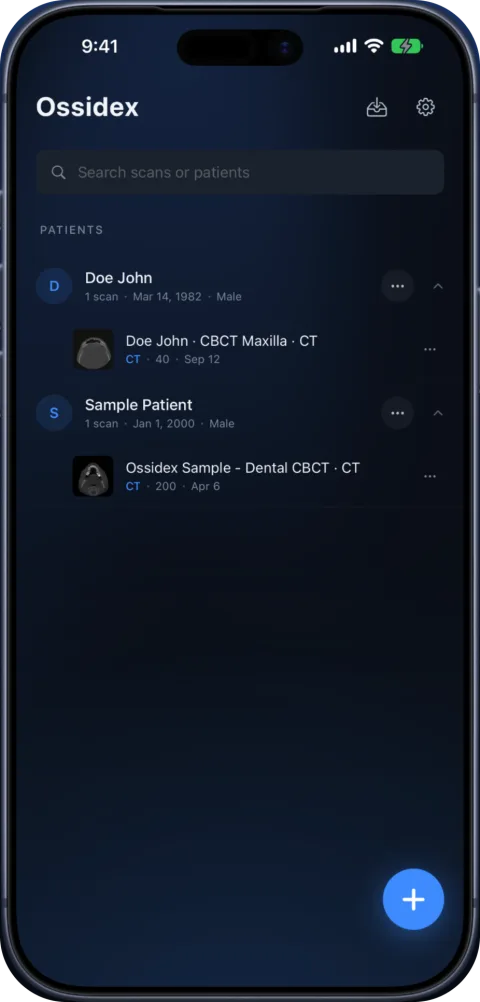
The .exe on the disc is just a viewer; the scan itself is almost always stored next to it as standard DICOM. Copy the entire disc folder — not only the .exe — to your iPad or iPhone and import the folder in Ossidex. It skips the Windows program and opens the images directly, without installing anything.
Why discs ship a Windows viewer
Clinics burn a viewer so the recipient can open the scan on a typical Windows PC. Most of these viewers do not run on macOS or iPadOS, and some install software first. The images are written separately in DICOM format, so any DICOM viewer can read them.
Viewers you may find on a disc
| Vendor software | Disc viewer | Images alongside |
|---|---|---|
| Dentsply Sirona Sidexis 4 | “Start Sidexis 4 Viewer.exe” (Windows, installs the viewer) | Exam data; DICOM export options available |
| Carestream CS 3D Imaging | CS 3D Imaging Lite, started with ViewData.exe | Standard DICOM volume, optionally with DICOMDIR |
| Vatech Ez3D-i | Simple Viewer Launcher / Simple Viewer Lite | “DCM Files” exported by default |
| Planmeca Romexis | Romexis Viewer (Windows and Mac launcher) | Multi-frame or single-frame DICOM, often with DICOMDIR |
Vendor-specific notes: Sidexis, CS 3D Imaging, Ez3D-i, Romexis.
Open it on iPad or iPhone
- Copy everything. On any computer, copy the whole disc to a folder (or ZIP) — viewer, DICOMDIR and all data folders.
- Transfer. AirDrop it from a Mac, use a USB-C drive, or upload the ZIP to a cloud service.
- Import the folder. In Ossidex tap + and choose the folder or ZIP. If you pick the .exe by mistake, Ossidex suggests the folder instead.
- View. Ossidex ignores the viewer program and helper files and lists the studies it found.
When there is no DICOM on the disc
Occasionally a disc contains only a proprietary project (for example Invivo .inv/.apj files or a vendor project folder) and no DICOM. No third-party viewer can open those reliably. Ask the clinic to export the scan as standard DICOM — every major CBCT package can do this.
On a Mac
On a Mac you can open the same folder in a desktop DICOM viewer, or AirDrop it to an iPad. The App Store also lists Ossidex’s iPad app for Macs with Apple M1 or later, marked “Designed for iPad, not verified for macOS”.
What happens if you pick the .exe in Ossidex
A common first attempt is to tap the viewer program itself — Viewer.exe, Start.exe or similar — in the Files app. Ossidex recognises that this is a Windows program, not an image, and suggests importing the whole disc folder instead, with a button to pick the folder. Import that folder and Ossidex skips the viewer files, reads the DICOMDIR or scans every file, and groups the images into studies.
Since version 1.11.1 Ossidex also recovers images that older discs store without standard DICOM identifiers (UIDs) and photos or JPEG files saved without an extension, so fewer discs end up with “nothing to import”. It also no longer asks for a password for the viewer’s own helper files — only for archives that are genuinely encrypted.
Typical disc layouts
| What you see on the disc | Where the images are | What to import |
|---|---|---|
DICOMDIR + DICOM/ folder + Viewer.exe | In DICOM/ | The whole disc folder |
autorun.inf + IMAGES/ + viewer folder | In IMAGES/ | The whole disc folder |
Numbered folders (PAT00001/STD00001/…) | In the numbered folders | The whole disc folder |
Only one large .exe or .zip.exe | Inside a self-extracting archive | Unpack on Windows first, or ask for a ZIP |
Vendor project file only (e.g. .inv) | In a proprietary format | Ask for a DICOM export |
Copying the disc without Windows
On a Mac, insert the disc (or an external drive), select everything on it in Finder and copy it into a new folder; the .exe files simply do not run, which is fine. Then AirDrop the folder to the iPad or put it in iCloud Drive. Without any computer, ask the clinic to copy the disc to a USB-C stick or to send a link — see DICOM viewer without a computer.
Frequently asked questions
Can I run the .exe viewer on an iPad?
No. iPadOS cannot run Windows programs. You do not need to — open the DICOM files with a DICOM viewer app.
Will Ossidex ask for a password for disc files?
Only for genuinely encrypted archives. Helper files on discs do not trigger a password prompt.
What if I only copied the viewer folder?
Ossidex will find no images. Go back and copy the whole disc.
Related pages
Open a DICOM CD on iPhone or iPad
Open a CT, MRI or CBCT disc from a hospital or dental clinic on iPhone or iPad: copy the disc folder, import it in Ossidex, and skip the Windows viewer.
Open CBCT from any scanner
What is on a CBCT disc, what to export, and vendor-by-vendor instructions.
Study won’t open: fixes
Fixes for DICOM studies that will not open: incomplete downloads, only the viewer copied, proprietary files, password archives, portal links, memory.
DICOMDIR: what it is and how to open it on iPhone, iPad or PC
A DICOMDIR is the index file on a medical imaging disc. Learn what it contains, why it sometimes fails, and how to open the whole disc on iPhone or iPad.