
Guide
DICOM viewer without a computer: review CT and CBCT on an iPad
Yes — you can review CT, dental CBCT and MRI on an iPad or iPhone without a computer. Ossidex (formerly MedScan), a DICOM viewer app, imports the files straight from a USB-C drive, the Files app, email or a cloud link, and shows them in 2D, MPR, 3D and a dental panoramic arch — no laptop needed. The only step that may need a computer is copying an optical disc.
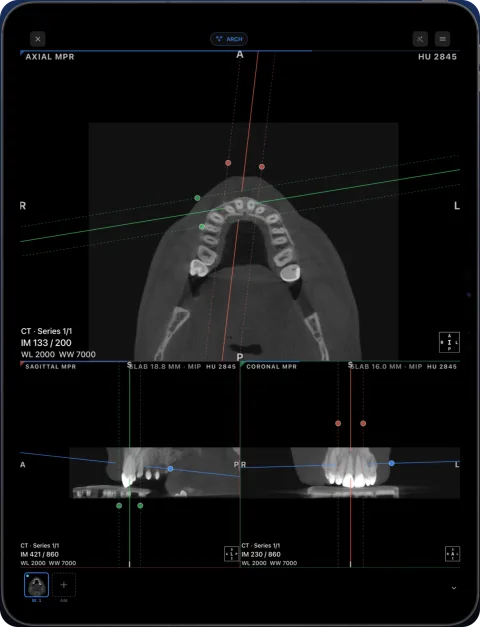
What you can do on the iPad alone
- Import from a USB-C stick or card reader, Files/iCloud Drive, Mail, messengers, AirDrop, or a Google Drive, Dropbox, OneDrive or WeTransfer link.
- Open disc folders with DICOMDIR, ZIP/RAR/7z/ISO archives and NIfTI files.
- Scroll slices, adjust window/level, measure in millimetres and HU.
- Use MPR, 3D, multi-panel and the dental arch with cross-sections (Pro).
- Connect to a PACS over DICOMweb.
- Export images, a PDF report or an anonymized copy.
When you still need a computer
| Situation | Why | Workaround |
|---|---|---|
| The scan is on a CD/DVD | iPads have no optical drive | Copy the disc once on any PC/Mac, or ask for a USB stick or link |
| Self-extracting .exe archive | Needs Windows to unpack | Ask the clinic for a plain ZIP or DICOM folder |
| Vendor project files only | Proprietary formats, not DICOM | Export standard DICOM from the vendor software |
| Implant planning or guide design | Needs dedicated planning software | Use your planning software; Ossidex is a viewer |
Why clinicians switch to an iPad
Open CT, dental CBCT and MRI from any scanner on the iPhone or iPad you already carry — no laptop needed. Clinicians who read scans outside the office — at the chair, in consultations at several clinics, on call — tell us the same thing: carrying a laptop just to open a disc is the part they want to drop. A tablet opens the study in seconds, is easy to show to a patient, and keeps the files on a device that is already locked with Face ID or a passcode.
Setting it up
- Install Ossidex. Free on the App Store for iPhone and iPad (iOS/iPadOS 17 or later).
- Try the sample scan. A built-in dental CBCT has every tool unlocked, so you can learn the gestures first.
- Import a real study. From a USB-C drive, Files or a link. Studies stay available offline.
Getting files onto the iPad without a computer
| Source | What you need | How |
|---|---|---|
| USB stick or external SSD | USB-C iPad (or Lightning to USB adapter) | Plug in; the drive appears in Files; import the folder |
| SD card from an imaging device | USB-C card reader | Same as a USB drive |
| Email or messenger | Nothing | Save the attachment to Files, or share it to Ossidex |
| Cloud link | Internet connection | Paste the Google Drive, Dropbox, OneDrive, iCloud, WeTransfer, Yandex Disk or Mail.ru link into Ossidex |
| PACS | DICOMweb endpoint and network access | Add the server in Ossidex and download the study |
| CD/DVD | An optical drive on any computer, once | Copy the disc to a folder or USB stick, or ask the clinic for a link |
Discs with a Windows viewer
Most patient discs carry a Windows viewer next to the images. On an iPad you do not need it: if you tap the .exe by mistake, Ossidex suggests importing the whole folder instead. It reads the DICOMDIR (or scans every file when the index is broken), skips the viewer files and asks for a password only when an archive really is encrypted. Details: the disc only has a Windows viewer.
Which iPad
Ossidex runs on iPads with iPadOS 17 or later. For large CT and CBCT volumes, MPR and 3D, a recent iPad with more memory gives the smoothest experience; an 11- or 13-inch screen is more comfortable for the dental arch with cross-sections than a phone. Storage matters too: keep a few gigabytes free for the studies you keep on the device.
Frequently asked questions
Can an iPad replace a diagnostic workstation?
It depends on the local requirements for your use. Many clinicians use it for review, consultation and patient communication.
Can I plug a USB drive into an iPad?
Yes. iPads with USB-C accept USB-C sticks and card readers directly; older iPads need Apple’s Lightning to USB adapter. The drive appears in the Files app.
Does it work on a Mac without installing a desktop viewer?
The App Store also offers the Ossidex iPad app on Macs with Apple M1 or later, marked “Designed for iPad, not verified for macOS”.
Related pages
Open a DICOM CD on iPhone or iPad
Open a CT, MRI or CBCT disc from a hospital or dental clinic on iPhone or iPad: copy the disc folder, import it in Ossidex, and skip the Windows viewer.
Dentists
CBCT from any scanner at the chair: arch, cross-sections, MPR, 3D and TMJ MRI.
Cloud-link import: providers and limits
Which share links Ossidex imports — Google Drive, Dropbox, OneDrive, iCloud Drive, WeTransfer, Yandex Disk, Mail.ru — how downloads resume, what won’t work.
Online DICOM viewer vs app
Browser viewers compared, what uploading means for privacy, and when an app is the better tool.
Best DICOM viewers 2026
14 desktop, web and mobile DICOM viewers compared: platforms, price, open source, offline use, PACS and iPad.