
NewTom (Cefla)
Open NewTom NNT CBCT scans on iPad and iPhone
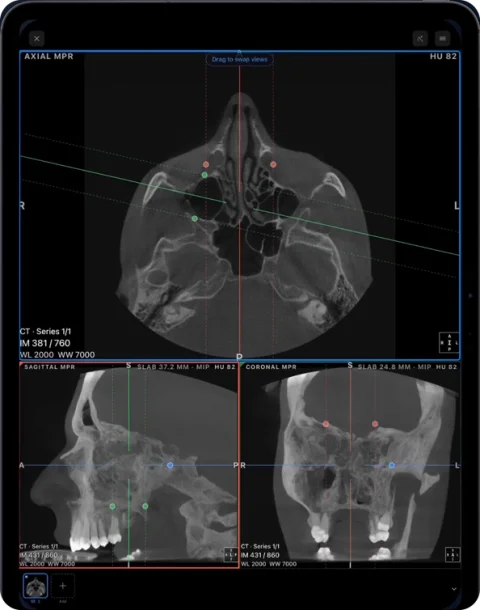
NewTom’s NNT software and NNT Viewer are Windows programs. To open a NewTom CBCT on iPad or iPhone, export the scan as DICOM and import it in Ossidex, a DICOM viewer app for iPhone and iPad that shows it in MPR, 3D and a panoramic arch with cross-sections.
How NNT shares scans
Cefla describes NNT as the imaging software for NewTom units, with built-in DICOM export and the option to create a free NNT Viewer for recipients. The viewer is Windows software; on a Mac, NewTom points to Parallels. Some third-party descriptions say an NNT DICOM export produces a DICOMDIR plus slice files — plausible and consistent with the DICOM standard, but check your own export.
For an iPad, the DICOM export is the part you need; the NNT Viewer can be left out.
How to open a NewTom scan in Ossidex
- Export DICOM from NNT. Use NNT’s DICOM export for the volume. If you received a disc with the NNT Viewer, use the whole disc.
- Copy the folder. Copy the export (with DICOMDIR if present) or the disc to iCloud Drive or a USB-C drive, or zip it and share a link.
- Import. In Ossidex tap + and pick the folder, archive or link.
- View. Open the volume in the arch view, MPR or 3D.
Reading a NewTom scan in Ossidex
NewTom units cover everything from small dental fields of view to large volumes that include the airway, sinuses and both TMJs. In Ossidex, use the arch view for dental questions — panorama and numbered cross-sections along the curve you trace — and MPR with slab for the sinuses, airway and joints. The 3D view renders the whole volume with bone and airway presets and a clipping plane. Measurements are in millimetres from the DICOM pixel spacing; annotations, reports and plans created in NNT are not part of the DICOM export.
Sharing NewTom scans with an iPad user
For a colleague on an iPad, export DICOM from NNT, zip the folder and share a link from iCloud Drive, Google Drive, Dropbox, OneDrive or WeTransfer. The recipient pastes the link into Ossidex, which downloads, unpacks and imports it in one step. Include the NNT Viewer only if the recipient may also use a Windows PC.
Common problems
- Disc opens only on Windows — that is the NNT Viewer. Copy the whole disc; if no DICOM images are on it, ask for a DICOM export.
- Large field-of-view volumes — full-skull scans are big; an iPad with more memory handles them more comfortably.
- Partial copy — copy every file of the export; missing slices produce an incomplete volume.
NewTom and NNT is a trademark of Cefla s.c.. Ossidex is an independent viewer and is not affiliated with, endorsed by or sponsored by Cefla s.c.. Vendor details below come from the vendor’s public documentation and may change between software versions.
Frequently asked questions
Is there an NNT Viewer for Mac or iPad?
NNT runs on Windows (Mac via Parallels, per NewTom). On an iPad, Ossidex opens NNT’s DICOM export.
Does it work with all NewTom units?
Any NewTom scan exported from NNT as standard DICOM opens in Ossidex.
Can I measure on NewTom scans?
Yes, in millimetres on slices, MPR planes and arch cross-sections.
Sources
Related pages
Open CBCT from any scanner
What is on a CBCT disc, what to export, and vendor-by-vendor instructions.
Dental CBCT viewer
Panoramic arch, cross-sections, MPR and 3D for cone beam CT from any scanner.
OnDemand3D
Export DICOM from Cybermed OnDemand3D instead of a project file.
i-CAT / KaVo / Invivo
Tx STUDIO exports and converting Invivo .inv/.apj files to DICOM.
DICOMDIR: what it is and how to open it on iPhone, iPad or PC
A DICOMDIR is the index file on a medical imaging disc. Learn what it contains, why it sometimes fails, and how to open the whole disc on iPhone or iPad.
DICOM measurements and PDF reports on iPhone and iPad
Measure length, angles and Hounsfield units on CT, CBCT and MRI in Ossidex, annotate the view, and export an image or a one-page PDF report, anonymized.