
3DICOM alternative
3DICOM alternative: an on-device DICOM viewer for iPhone and iPad
3DICOM, by Singular Health, runs on the web, Windows, Mac, iOS and Android, with yearly plans and a free mobile app that needs an internet connection to load scans. Ossidex is an iPhone and iPad viewer that imports and renders studies entirely on the device, with MPR, 3D and a dental arch. All options side by side: best DICOM viewers in 2026.
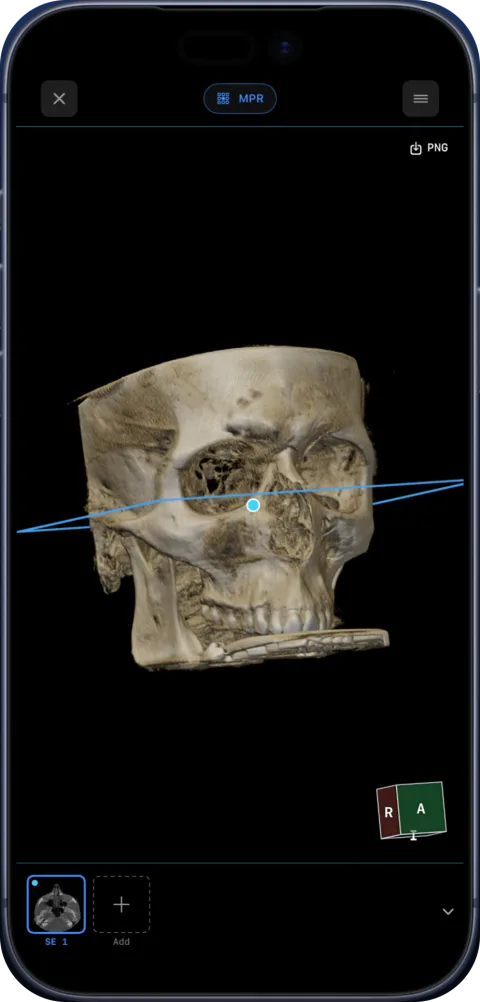
What 3DICOM does well
- Available almost everywhere: web, desktop, iOS and Android.
- A strong 3D focus with STL export (EDU tier and above) and collaboration tools.
- Plans for patients ($29.95/year), education ($599.95/year) and clinicians ($999.95/year), as listed on the vendor site, September 2026.
3DICOM vs Ossidex
| 3DICOM | Ossidex | |
|---|---|---|
| Platforms | Web, Windows, Mac, iOS, Android | iPhone, iPad (iOS/iPadOS 17+) |
| Mobile app | 3DICOM Mobile, free; needs internet to load scans | Native; works offline once imported |
| Price | Yearly plans with credits | Free download; Pro subscription (monthly or yearly) for MPR, 3D, arch |
| MPR / 3D | 3D focus; STL export on higher tiers | Yes (Pro): linked MPR, oblique, slab; 3D volume rendering |
| Dental panoramic arch | Not listed | Panoramic arch with cross-sections, tooth numbering (Pro) |
| Privacy | Cloud-based sharing and storage | On-device; no account; images not uploaded to Ossidex servers |
Checked: September 2026, on the vendor sites and the US App Store (sources below). Prices are as listed on the vendor site, September 2026, and may change.
Cloud workflow vs on-device workflow
3DICOM is built around its platform: scans are uploaded, stored and shared through Singular Health’s services, and plans come with credits for storage, sharing and AI tools. That is convenient when a team collaborates on the same case across web, desktop and phones. The trade-off is that the mobile app needs a connection to load scans and that images live in the vendor’s cloud.
Ossidex works the other way round. Scans are opened and processed on your iPhone or iPad. There is no account, and your images are not uploaded to Ossidex servers. Studies are imported from where they already are — a disc folder, an archive, a share link or your own PACS — and read on the device, offline.
Getting studies into each
With 3DICOM you typically upload a study to the platform, then open it on any device, with credits covering storage and sharing. With Ossidex there is no upload step and no credit system: the study is imported from wherever it already is. What Ossidex imports — disc folders, archives, share links and DICOMweb — is listed on cloud-link import and formats.
Dental CBCT
3DICOM focuses on general 3D visualisation and STL export. For dental CBCT, Ossidex offers a panoramic arch traced on an axial slice, a live panorama, numbered cross-sections along the curve with rulers, tooth numbering and a PDF report with the panorama and all cross-sections. It opens CBCT from any vendor that exports standard DICOM. CBCT viewer.
Moving a study to Ossidex
- Find the original DICOM. Use the original disc, ZIP or folder you uploaded to 3DICOM — Ossidex needs the DICOM files, not a 3D model.
- Put it on the device. AirDrop, iCloud Drive, a USB-C drive, or a share link from Google Drive, Dropbox, OneDrive or WeTransfer.
- Import and view. Import the folder, archive or link in Ossidex; the study opens in 2D, and with Pro in MPR, 3D or the dental arch.
Which to choose
Choose 3DICOM if you need Android, the web, STL export or a cloud platform. Choose Ossidex if you want studies to stay on your iPhone or iPad, work offline, and read dental CBCT with cross-sections along the arch.
Frequently asked questions
Does 3DICOM work offline?
The 3DICOM Mobile App Store listing says it needs an internet connection to load scans. Ossidex opens imported studies offline.
Does Ossidex export STL?
No. Ossidex exports images, PDF reports and anonymized DICOM.
Is 3DICOM free?
The mobile app is free to download; desktop and web plans are yearly subscriptions with credits.
Can Ossidex open an STL or 3D model from 3DICOM?
No. Ossidex opens DICOM, DICOMDIR, Enhanced multi-frame and NIfTI images, not surface meshes.
Which is better for sharing a case with a colleague?
3DICOM’s platform is designed for sharing. With Ossidex, export an anonymized copy or a PDF report and send it however you like.
Does 3DICOM Mobile run on Android?
Yes, 3DICOM has iOS and Android apps. Ossidex is iPhone and iPad only.
Sources
Related pages
Best DICOM viewers 2026
14 desktop, web and mobile DICOM viewers compared: platforms, price, open source, offline use, PACS and iPad.
MPR and 3D volume rendering on iPhone and iPad
Multi-planar reconstruction with linked crosshairs, oblique planes and slab MIP, plus 3D volume rendering with presets and clipping, for CT, CBCT and MRI.
Offline, on-device DICOM viewer: your scans never leave the device
Ossidex opens and renders scans on your iPhone or iPad. No account, no upload of images to our servers, offline viewing, anonymized export when you share.
Ossidex vs IMAIOS DICOM Viewer (IDV)
IMAIOS DICOM Viewer is free for personal use on web, iOS and Android. Ossidex adds a dental arch, archives, cloud links and PACS. Where each wins, 2026.
Ossidex vs LumaDICOM
LumaDICOM is a new free iOS DICOM viewer with MPR, 3D and OPG panorama. How it compares with Ossidex on imports, dental tools, PACS and price, 2026.
Patients
Got a CD or link with your scan? View it at home, privately.