
Horos alternative
Horos for iPad and iPhone? A mobile alternative to Horos
Horos is a free, open-source DICOM viewer for macOS. Horos Mobile for iPhone and iPad is made by iCat Solutions Ltd, which the Horos Project describes as its partner; it is a separate app from the free Mac viewer, listed in the App Store as Falcon Mx. Ossidex is another native iPhone and iPad option that opens CT, CBCT and MRI from discs, archives and links, with a dental arch. All options side by side: best DICOM viewers in 2026.
Horos, Horos MD and Horos Mobile
The open-source Horos project (LGPL-3.0, main sponsor Purview) makes the free macOS viewer, now with Apple Silicon and macOS 26 support. Horos MD is a commercial product from iCat Solutions Ltd. Horos Mobile is presented on horosproject.org as “a version of the Horos medical image viewer for iOS devices”, made by iCat Solutions, which the project calls its partner; the page links to the App Store app Falcon Mx. iCat Solutions also sells Falcon MD, a subscription app for clinicians.
| Falcon Mx (Horos Mobile) | Ossidex | |
|---|---|---|
| Developer | iCat Solutions Ltd (Horos Project partner) | Ossidex |
| Price | Free download | Free download; Pro subscription for MPR, 3D, arch |
| Last update (US App Store) | v27.0.0, September 15, 2026 | v1.11, September 24, 2026 |
| US ratings | 4.5 (281) | Too few to report |
| Requires | iOS 26 | iOS 17 |
| Imports | iCloud Drive, Dropbox, Google Drive, DICOM nodes, Bonjour | Disc folders, ZIP/RAR/7z/ISO, NIfTI, links from 7 cloud services, DICOMweb |
| MPR / 3D | Yes / Yes | Yes / Yes (Pro) |
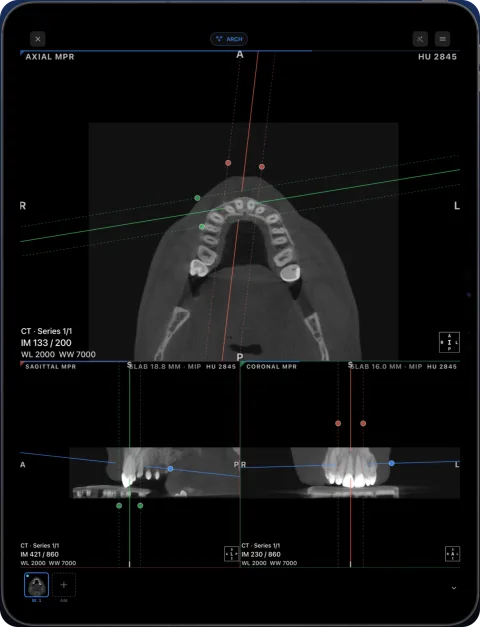
| Dental arch with cross-sections | Not listed | Yes (Pro) |
If you already use Horos on a Mac and a PACS, Falcon Mx keeps you in the same family. If your studies arrive as discs, archives or links, or you read dental CBCT, compare it with Ossidex on your own scan.
What Horos does well
- Free and open source, native on macOS.
- A mature toolset inherited from the OsiriX code base: MPR, 3D, PACS and plugins.
- Community support, tutorials and optional HorosCloud.
Horos vs Ossidex
| Horos | Ossidex | |
|---|---|---|
| Platforms | macOS (Apple Silicon supported) | iPhone, iPad (iOS/iPadOS 17+) |
| iPhone / iPad app | Horos Mobile (Falcon Mx) by partner iCat Solutions | Yes, native |
| Price | Free, open source (donations) | Free download; Pro subscription (monthly or yearly) for MPR, 3D, arch |
| MPR / 3D | Yes | Yes (Pro): linked MPR, oblique, slab; 3D volume rendering |
| PACS | Yes | DICOMweb (QIDO-RS / WADO-RS); 3 free downloads, unlimited in Pro |
| Dental panoramic arch | Not listed | Panoramic arch with cross-sections, tooth numbering (Pro) |
| Archives and cloud links | Not listed | ZIP, RAR, 7z, ISO; Google Drive, Dropbox, OneDrive, iCloud Drive, WeTransfer, Yandex Disk, Mail.ru Cloud, direct URLs |
Checked: September 2026, on the vendor sites and the US App Store (sources below). Prices are as listed on the vendor site, September 2026, and may change.
Moving a study from Horos to an iPad
Horos works best with its local database and a PACS. To open a Horos study on an iPad, export it as DICOM files, AirDrop the folder or a ZIP to the iPad and import it in Ossidex — or, if you stay in the Horos family, send it to Falcon Mx over DICOM. What Ossidex imports — disc folders, archives, share links and DICOMweb — is listed on cloud-link import and formats.
Who should pick which
- Radiologist reading on a Mac all day: Horos (free) or another desktop workstation.
- Dentist who reads CBCT at the chair: Ossidex on an iPad, with the panoramic arch and cross-sections.
- Clinician who gets studies from other hospitals as discs or links: Ossidex imports them on the device without a Mac.
- Patient who wants to see their own scan: Ossidex’s free 2D viewer is enough. For patients.
What we could not verify
We checked the Horos project site and did not test every plugin or HorosCloud feature. Features marked “Not listed” are ones we found no public statement about.
Where each fits
Keep Horos if you read on a Mac and want a free, extensible desktop viewer. Use Ossidex when you want to open studies on iPhone or iPad — at the chairside, on a ward round or at home — including dental CBCT with a panoramic arch.
Moving a study is simple: export it from Horos as DICOM to a folder, AirDrop or zip it to the iPad, and import the folder in Ossidex.
Frequently asked questions
Is there Horos for iPad?
Horos Mobile for iPhone and iPad is made by iCat Solutions Ltd, which the Horos Project describes as its partner; it is a separate app from the free Mac viewer and appears in the App Store as Falcon Mx.
Is Horos free?
Yes. Horos is free and open source under LGPL-3.0.
Can I move studies from Horos to Ossidex?
Yes. Export the study as DICOM, send the folder to the iPad (AirDrop, iCloud Drive, USB-C drive) and import it in Ossidex.
Does Horos run on Apple silicon?
Yes. The Horos project lists Apple Silicon and macOS 26 support.
Is Falcon Mx the same as Horos?
No. Falcon Mx and Falcon MD are iOS apps from iCat Solutions Ltd, a different company from the Horos open-source project.
Does Ossidex open studies exported from Horos?
Yes. Horos exports standard DICOM, which Ossidex imports as a folder or ZIP.
Sources
Related pages
Best DICOM viewers 2026
14 desktop, web and mobile DICOM viewers compared: platforms, price, open source, offline use, PACS and iPad.
OsiriX alternatives: Mac viewers and an iPad option
Alternatives to OsiriX MD and OsiriX Lite on the Mac — Horos, Weasis, 3D Slicer — and on iPad and iPhone without a Mac. Prices and features, checked 2026.
Ossidex vs OsiriX HD
OsiriX HD is a free iOS DICOM viewer last updated in 2023, strong on DICOM networking. Ossidex is actively updated with MPR, 3D and a dental arch.
Weasis alternative for iPhone and iPad
Weasis is a free open-source DICOM viewer for Windows, macOS and Linux, with no iOS app. Ossidex opens the same studies on iPhone and iPad. Comparison 2026.
Best DICOM viewer apps for iPad and iPhone
Ten iOS DICOM apps compared: imports, offline use, MPR/3D, dental tools, last update and ratings.