
Head-to-head
Falcon Mx (formerly Horos Mobile) vs Ossidex: iPad and iPhone DICOM viewers compared
Falcon Mx, formerly Horos Mobile, is iCat Solutions’ DICOM viewer for iPhone, iPad, Mac and Apple Vision Pro, strong on 3D, ROI tools and PACS connections through DICOM nodes. It is free to download with in-app subscriptions and now requires iOS 26. Ossidex runs on iOS 17 and later, imports discs, archives and cloud links directly and adds a dental panoramic arch; 2D is free, MPR, 3D and the arch are in Pro.
Side by side
| Falcon Mx | Ossidex | |
|---|---|---|
| Developer | iCat Solutions Ltd (Horos Project partner) | Ossidex |
| Platforms | iPhone, iPad, Mac, Apple Vision Pro | iPhone, iPad (iOS/iPadOS 17+) |
| Requires | iOS / iPadOS 26 | iOS / iPadOS 17 |
| Price model | Free download; in-app subscriptions, trial | Free download; Pro subscription (monthly or yearly) for MPR, 3D, arch |
| Latest version (US App Store) | 27.0.0, September 15, 2026 | 1.11.1, September 29, 2026 |
| US ratings | 4.5 (281) | Too few to report |
| Imports | iCloud Drive, Dropbox, Google Drive; DICOM nodes (PACS); DICOM or Bonjour between devices | Files, disc folders, archives, NIfTI, share links, DICOMweb |
| MPR / 3D | Orthogonal and 3D MPR, thick slab; volume and SSD rendering | Yes (Pro): linked MPR, oblique, slab; 3D volume rendering |
| Measurements | Distance, angle, Cobb angle, area ROI, freehand, cardio-thoracic ratio | Length, angle, HU probe / ROI; PDF report |
| Dental arch with cross-sections | Not listed | Panoramic arch with cross-sections, tooth numbering (Pro) |
| Interface languages | 9 | 46 |
Checked September 29, 2026 in the US App Store and on the vendors’ sites. “Not listed”: not mentioned in the listing or on the vendor site. Falcon’s product page still says iOS 17; the App Store listing requires iOS 26.
iOS version, devices and price
According to Apple’s compatibility lists, these devices run iOS or iPadOS 17 but cannot update to 26, so the current Falcon Mx does not install on them, while Ossidex does: iPhone XR, XS and XS Max; iPad (6th and 7th generation); iPad Pro 10.5-inch and iPad Pro 12.9-inch (2nd generation). Newer devices run both. Falcon Mx also runs on Mac (macOS 26) and Apple Vision Pro; Ossidex is built for iPhone and iPad.
Falcon Mx’s US listing shows Basic, Classic and Standard subscriptions (monthly, six-monthly or yearly) and a Falcon Cloud plan; iCat Solutions offers a trial. The listing does not say which tools work without a subscription, so try it on a real study.
Getting studies in
Falcon Mx is built around networks and its own services: DICOM nodes to import from a PACS, DICOM or Bonjour transfers between devices, imports from iCloud Drive, Dropbox and Google Drive, Falcon Link for patients to share studies with you, and Falcon Cloud in selected countries. Its listing does not mention archives, DICOMDIR discs or NIfTI.
Ossidex is built around the files people receive: disc folders with DICOMDIR; ZIP, RAR (including RAR5 and multi-volume), 7z, TAR/GZ and ISO, password-protected too; files without an extension, preamble or UIDs; NIfTI; and share links from Google Drive, Dropbox, OneDrive, iCloud Drive, WeTransfer and Mail.ru Cloud. It reaches a PACS through DICOMweb only and is not a DICOM node. Details: cloud-link import and formats.
Both keep imported studies on the device; Ossidex needs no account and does not upload images.
Viewing and measuring
Falcon Mx has the broader toolset: MIP, MinIP and Mean modes, surface (SSD) rendering, a CLUT editor, brush and auto-removal tools for 3D renders, synchronised split screens, DICOM metadata editing and ROI tools up to Cobb angle, area statistics and the cardio-thoracic ratio. If you need those on the iPad, Falcon Mx is the better choice.
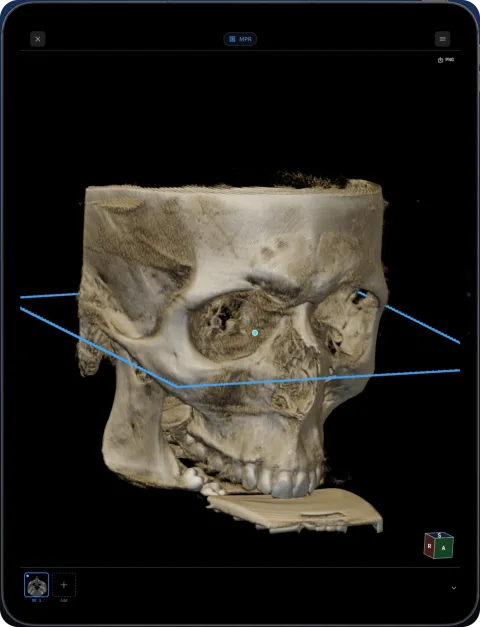
Ossidex covers the core reading tools: linked MPR with crosshairs, an oblique plane by rotating a reference line, adjustable slab with MIP/MinIP, 3D with bone, teeth and airway presets and a clipping plane, and length, angle and HU measurements on calibrated CT with a PDF report. MPR and 3D in Ossidex.
Dental CBCT
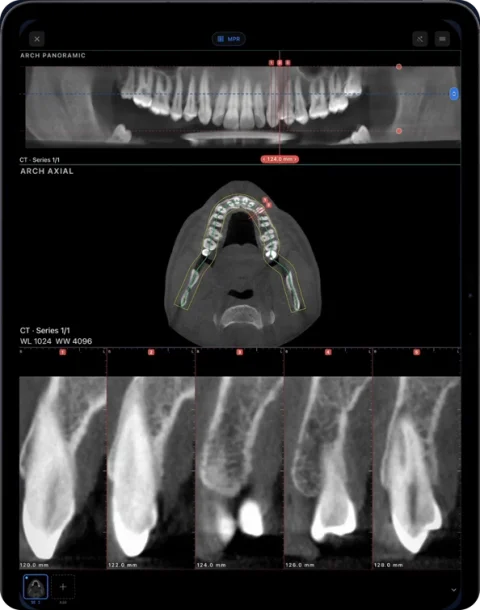
Falcon Mx lists no dental panorama, arch or cross-sections; in the Falcon family, curved MPR is listed only for Falcon MD on macOS. Ossidex reads CBCT from any scanner that exports standard DICOM, with a panoramic arch you edit point by point, numbered cross-sections and tooth numbering. Implant planning and endodontic tools are not available yet. CBCT viewer for dentists.
Who should choose which
- Falcon Mx: your PACS or modality is set up for DICOM nodes, you already use Horos or Falcon MD on a Mac, you want the same viewer on Mac and Vision Pro, or you need its extended ROI tools, and your devices run iOS 26.
- Ossidex: your iPhone or iPad stays on iOS 17 or 18, studies arrive as discs, archives or share links, you read dental CBCT, you want free 2D viewing, or you prefer one of its 46 languages.
Both are free to install; opening the same study in each is the quickest test.
Moving from Falcon Mx to Ossidex
- Export as DICOM. In Falcon Mx, export the study in DICOM, not JPEG: MPR, 3D and calibrated measurements need the original DICOM. Anonymise it if the copy leaves your practice.
- Save it to Files. Save the export to the Files app (On My iPad or iCloud Drive) or AirDrop it to the device; a ZIP works too.
- Import in Ossidex. Tap + → Files and pick the folder or ZIP, or paste a Google Drive, Dropbox or WeTransfer link.
Frequently asked questions
Is Falcon Mx the same as Horos Mobile?
Yes. Its App Store listing says “Formerly known as Horos Mobile”, and the Horos Project’s Horos Mobile page links to the same app. It is made by iCat Solutions Ltd, which the project calls its partner, and is separate from the free Horos viewer for Mac.
Does Falcon Mx work on iOS 17 or iOS 18?
The current version, 27.0.0, requires iOS or iPadOS 26, so it does not install on devices that stop at iOS 17 or 18, such as iPhone XS or iPad (7th generation). Ossidex requires iOS 17 or later.
Is Falcon Mx free?
It is free to download, with in-app subscriptions and a trial. In Ossidex, import, 2D viewing, window/level and measurements are free; MPR, 3D and the dental arch are in Pro.
What is the difference between Falcon Mx and Falcon MD?
Both come from iCat Solutions Ltd. Falcon MD is a separate app aimed at clinical reading that needs an active yearly subscription to import and view studies; Falcon Mx is the general viewer, described in its listing as for informational use.
Which is better for dental CBCT?
Ossidex, if you need a panoramic arch with numbered cross-sections and tooth numbering. Falcon Mx lists MPR and 3D but no dental tools.
Sources
- Falcon Mx — DICOM Viewer (US App Store)
- Falcon Mx — iTunes Lookup (US)
- Falcon MD — DICOM Viewer (US App Store)
- Falcon Mx product page and tech specs
- Falcon — What’s New
- Falcon — Switch to Falcon (trial)
- Horos Project — Horos Mobile
- Apple — iPhone models compatible with iOS 26
- Apple — iPad models compatible with iPadOS 26
- Apple — iPhone models compatible with iOS 17
- Apple — iPad models compatible with iPadOS 17
Related pages
Horos alternative for iPhone and iPad
Horos is a free macOS DICOM viewer; its iPad counterpart Horos Mobile (Falcon Mx) comes from partner iCat Solutions. How both compare with Ossidex, 2026.
Best DICOM viewer apps for iPad and iPhone
Ten iOS DICOM apps compared: imports, offline use, MPR/3D, dental tools, last update and ratings.
Best DICOM viewers 2026
14 desktop, web and mobile DICOM viewers compared: platforms, price, open source, offline use, PACS and iPad.
Ossidex vs OsiriX HD
OsiriX HD is a free iOS DICOM viewer last updated in 2023, strong on DICOM networking. Ossidex is actively updated with MPR, 3D and a dental arch.
Dental CBCT viewer
Panoramic arch, cross-sections, MPR and 3D for cone beam CT from any scanner.