
Format guide
NIfTI viewer for iPhone and iPad: open .nii and .nii.gz files
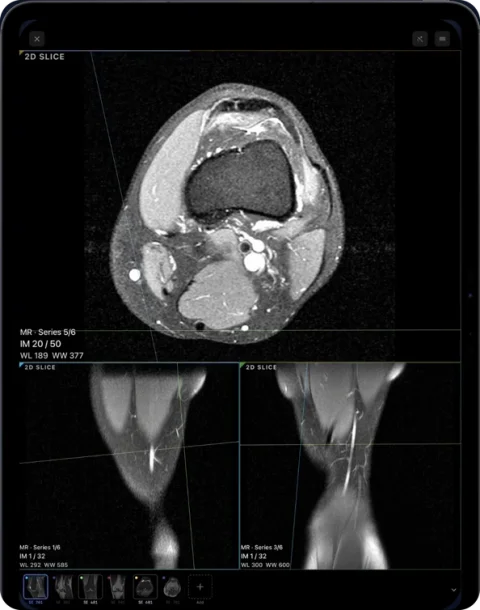
Ossidex opens NIfTI-1 files (.nii and gzip-compressed .nii.gz) on iPhone and iPad. It applies the orientation stored in the file, including sheared affines, shows the volume in 2D, MPR and 3D, and displays label maps and segmentation masks as layers you can toggle per segment.
What NIfTI is
NIfTI (Neuroimaging Informatics Technology Initiative) is a research format for volumetric data, widely used in neuroimaging and machine-learning pipelines (for example segmentation outputs). Unlike DICOM, one .nii file holds the whole volume and a compact header with voxel size and orientation, but little patient or scanner detail.
Supported
| Feature | Status |
|---|---|
| NIfTI-1 .nii and .nii.gz | Yes |
| Orientation from sform/qform, including shear | Yes |
| Label maps / masks as overlay layers | Yes |
| Per-segment visibility | Yes |
| NIfTI-2 | Not yet |
| 4D NIfTI and float overlays | Not yet |
Open a NIfTI file
- Save the file. Put the .nii or .nii.gz (and any mask files) in Files, or share a link.
- Import. Tap + → Files in Ossidex and select the files.
- View. The volume opens; masks appear as layers with a toggle for each segment.
NIfTI vs DICOM at a glance
| DICOM | NIfTI-1 | |
|---|---|---|
| Typical use | Clinical imaging and archiving | Research, analysis, AI pipelines |
| Files per volume | Often one per slice | One file (.nii or .nii.gz) |
| Patient and study metadata | Extensive | Minimal |
| Orientation | Per image position/orientation tags | qform/sform matrices |
| Segmentations | DICOM SEG, RTSTRUCT | Label-map volumes |
NIfTI viewers by platform
| Viewer | Platform | Price | Best for |
|---|---|---|---|
| MRIcroGL | Windows, macOS, Linux | Free | Quick viewing and rendering of research volumes |
| ITK-SNAP | Windows, macOS, Linux | Free, open source | Manual and semi-automatic segmentation |
| 3D Slicer | Windows, macOS, Linux | Free, open source | Segmentation, registration and analysis |
| FSLeyes | macOS, Linux (part of FSL) | Free for non-commercial use | Neuroimaging analysis output |
| NiiVue / Papaya | Web browser | Free, open source | Viewing in a browser without installing |
| Ossidex | iPhone, iPad | Free download; Pro for MPR and 3D | Viewing volumes and masks on a phone or tablet |
Desktop research tools remain the right place for analysis; Ossidex is for looking at a volume or a segmentation away from the computer.
Opening NIfTI step by step on iPad
- Collect the files. Put the image volume and its mask files in one folder in Files, or zip them.
- Import the folder. Tap + → Files in Ossidex and select the folder or ZIP.
- Toggle segments. Open the layers panel to show or hide each labelled structure over the image.
Typical NIfTI sources
| Source | Example |
|---|---|
| Neuroimaging research | Brain MRI converted from DICOM with dcm2niix |
| Segmentation tools | Label maps from 3D Slicer, ITK-SNAP or nnU-Net |
| Public datasets | Challenge datasets and open research collections |
| AI pipelines | Model outputs saved as masks next to the input volume |
Masks as layers
Import the image volume together with its mask files. Ossidex recognises label maps and shows them as coloured overlays; each segment gets its own visibility toggle, so you can show one structure at a time. Masks follow the same orientation as the volume, including sheared affines, which is where many simple viewers draw overlays in the wrong place.
Orientation, explained briefly
A NIfTI header stores how voxel indices map to patient space (the qform and sform matrices). Viewers that ignore them show the volume flipped or rotated. Ossidex applies the stored transform and labels directions (left/right, anterior/posterior, superior/inferior) accordingly.
Limits
NIfTI files contain little clinical metadata — no patient name, study date or scanner details — so the study appears under the file name. NIfTI-2, 4D time series and floating-point overlay maps are not supported yet.
Frequently asked questions
Can I view a segmentation from 3D Slicer or nnU-Net?
If it is saved as NIfTI-1 label map, yes — it appears as a layer over the image volume.
Is NIfTI better than DICOM?
They serve different purposes: DICOM is the clinical standard with full metadata; NIfTI is a compact research format.
Can I measure on NIfTI volumes?
Yes. Distances use the voxel size stored in the NIfTI header, in millimetres, on slices and MPR planes.
Where do I get NIfTI files from DICOM?
Research tools such as dcm2niix convert DICOM series to NIfTI. For clinical viewing you do not need to convert — Ossidex opens the original DICOM.
Can I convert NIfTI back to DICOM in Ossidex?
No. Ossidex opens NIfTI for viewing and exports images or PDF, not DICOM.
Does .nii.gz need unpacking first?
No. Gzip-compressed NIfTI is read directly.
Sources
Related pages
Supported formats: every DICOM file, disc and archive Ossidex opens
Full list of what Ossidex opens on iPhone and iPad: DICOM, DICOMDIR, Enhanced multi-frame, NIfTI, JPEG 2000/HTJ2K/JPEG-LS, ZIP, RAR, 7z, ISO and more.
MPR and 3D volume rendering on iPhone and iPad
Multi-planar reconstruction with linked crosshairs, oblique planes and slab MIP, plus 3D volume rendering with presets and clipping, for CT, CBCT and MRI.
View MRI scans on your phone
View MRI scans on iPhone or iPad: import the disc or link, understand series and sequences like T1, T2 and FLAIR, link windows and adjust contrast in Ossidex.
Radiologists
Quick CT and MRI review away from the workstation, PACS via DICOMweb, MPR and 3D.