
Dentsply Sirona
Open Sidexis and Galileos CBCT scans on iPad and iPhone
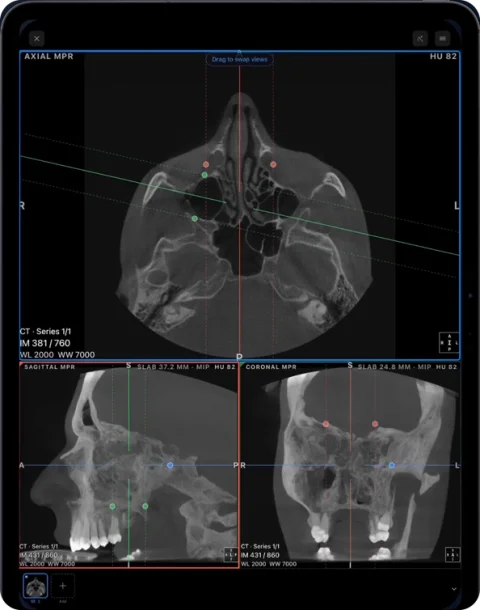
Sidexis 4 Viewer and Galileos Viewer are Windows programs. To open a Dentsply Sirona CBCT on iPad or iPhone, use the DICOM files from a DICOM export or disc in Ossidex, a DICOM viewer app for iPhone and iPad, which shows the volume in MPR, 3D and a panoramic arch.
How Sidexis shares scans
Sidexis 4 offers several ways to hand over an exam:
- Wrap&Go — burns the exam together with the Sidexis 4 Viewer (2D) or the Galileos Viewer (3D). The recipient starts the disc with a file called “Start Sidexis 4 Viewer.exe”, which installs the viewer on a Windows PC and requires .NET.
- DICOM exam export — writes standard DICOM files.
- DICOM Media export — writes a DICOM disc structure; in older Sidexis/Galaxis versions this is a
DICOMRMfolder plus aDICOMDIRfile. A “Volume (DICOM)” export produces several hundred single-slice.dcmfiles.
For an iPad, a DICOM or DICOM Media export is the most reliable. Whether a particular Wrap&Go disc also contains plain DICOM files depends on the options used when it was burned — if it holds only the viewer’s own data, ask for a DICOM export.
How to open a Sidexis scan in Ossidex
- Get a DICOM export. Export the exam as DICOM (or DICOM Media) from Sidexis 4, or use the disc you received.
- Copy everything. Copy the whole export folder or disc — including
DICOMDIRand theDICOMRMor image folders — to iCloud Drive or a USB-C drive, or zip it and share a link. - Import. In Ossidex tap +, choose the folder, the archive or paste the link. Ossidex skips the Windows viewer and its installer.
- View. Open the volume in MPR, 3D or the arch view with cross-sections.
Galileos and Orthophos volumes in the viewer
Galileos and Orthophos 3D volumes exported as DICOM open as a single CBCT series. Use the arch view for a panoramic overview with cross-sections — the counterpart of the panoramic and cross-sectional views in the Galileos Viewer — and MPR for axial, sagittal and coronal planes. 2D exams from Sidexis (panoramic, cephalometric, intraoral) exported as DICOM open as 2D images in the same patient, so an OPG and a CBCT can sit side by side. Annotations, implant plans and reports made in Sidexis are not part of the DICOM image data and do not appear.
Common problems
- Only “Start Sidexis 4 Viewer.exe” works on the disc — the disc may not contain plain DICOM. Ask the sender for a DICOM export; see disc with only an .exe viewer.
- Hundreds of files and no series — make sure all slice files were copied; a partial copy produces an incomplete volume.
- Default export folder — on the Sidexis PC, exports are typically written under a Sirona export folder in ProgramData, with 3D data in a subfolder; check your export settings.
Sidexis and Galileos is a trademark of Dentsply Sirona. Ossidex is an independent viewer and is not affiliated with, endorsed by or sponsored by Dentsply Sirona. Vendor details below come from the vendor’s public documentation and may change between software versions.
Frequently asked questions
Is there a Sidexis viewer for Mac or iPad?
Dentsply Sirona’s viewers run on Windows. On an iPad, Ossidex opens the DICOM export of the same exam.
Can I open a Galileos 3D scan?
Yes, once it is exported as DICOM. The volume opens in MPR, 3D and the arch view.
Do I need .NET or the installer?
No. Those are needed only for the Windows viewer on the disc. Ossidex reads the DICOM files.
Sources
Related pages
Open CBCT from any scanner
What is on a CBCT disc, what to export, and vendor-by-vendor instructions.
Dental CBCT viewer
Panoramic arch, cross-sections, MPR and 3D for cone beam CT from any scanner.
Planmeca Romexis
Open Romexis DICOM exports and patient discs made with Romexis Viewer.
Carestream CS 3D Imaging
Discs with CS 3D Imaging Lite and DICOM volume exports.
DICOMDIR: what it is and how to open it on iPhone, iPad or PC
A DICOMDIR is the index file on a medical imaging disc. Learn what it contains, why it sometimes fails, and how to open the whole disc on iPhone or iPad.
Disc with only a Windows .exe viewer
Dental and hospital discs often ship a Windows-only viewer. The images next to it are standard DICOM — copy the whole folder and open it on iPad, iPhone or Mac.